
Light, sensors and exposure
A photo is a record of how much light reached each tiny point of the sensor. Learn what exposure means, why a picture comes out too dark or blown out, and how to read the histogram.
WHAT A PHOTO RECORDS
A grid of tiny light catchers
Light from the scene passes through the lens and lands on the sensor, a grid of millions of tiny light-sensitive points called photosites. A "12 MP" phone camera has about 12 million of them. For the moment the photo is taken, each point collects light and turns it into a brightness value. Put all those values side by side and you have a picture. Film did the same job with chemistry instead of electronics.
A white shirt in the sun sends a lot of light to the points it falls on, so they record high values. The dark doorway behind it sends very little, so its points record low ones.
Exposure
How much light the sensor collects for one photo. Too little and the picture is underexposed: dark and murky, with the shadows losing their detail. Too much and it's overexposed: bright areas turn pure white with nothing left in them, which photographers call blown out or clipped.
A face lit by a window, photographed with the right exposure, shows skin texture on the bright cheek and detail in the dark hair. Overexpose it and the cheek becomes a flat white patch.
Buckets in the rain
Picture each point on the sensor as a bucket left out in the rain. A short shower leaves most buckets nearly empty: a dark picture. A good shower fills them to different levels: a picture with darks and brights. A downpour fills some to the brim and they overflow, and those become pure white. The water that spilled is gone; you can't pour it back in later. That's the key lesson: blown highlights can't be recovered in editing, while dark shadows can often be lifted a little, at the cost of some grain. When in doubt, protect the bright parts.
Check yourself
In Sara's photo of her sister's white wedding dress, the dress is a flat white shape with no lace visible at all. What happened?
- The dress was underexposed, and brightening it in an editing app will bring the lace back
- The dress was overexposed: those points clipped to pure white, so the lace detail can't be brought back
- The phone's lens was dirty, which always turns white things into flat shapes
- White fabric can never show detail in a photo, whatever the settings
Show the answer
The dress was overexposed: those points clipped to pure white, so the lace detail can't be brought back
Right. Too much light reached the points under the dress, they filled to the top and recorded pure white. Like an overflowing bucket, the lost detail isn't anywhere in the file to recover.
Step through it
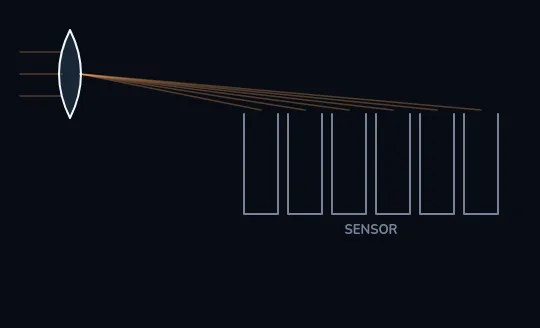
Light through the lens onto an empty sensor Light from the scene comes in on the left, passes through the lens and is aimed at the sensor, drawn here as six wells. Each well stands for one of the millions of tiny points that collect light. Nothing has been collected yet, so all six are empty.
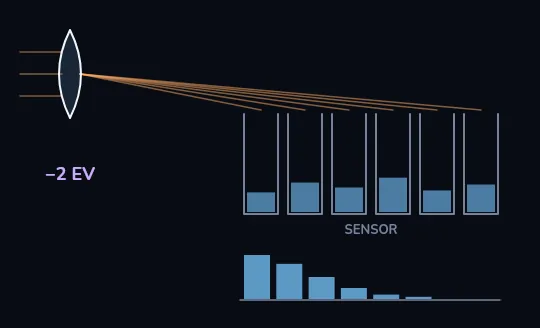
−2 EV: too little light Two stops less light than a good exposure, which is a quarter of it. The wells fill only to about 20 to 35 percent, so the whole picture comes out dark. The histogram that appears underneath is crowded against its left, dark edge.
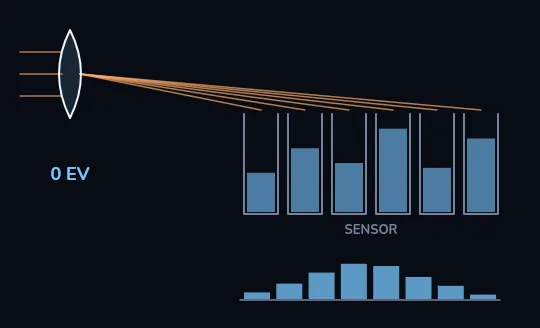
0 EV: a good exposure With the right amount of light the wells fill to different levels, from about 40 to 85 percent, just as a real scene has darker and brighter parts. The histogram spreads across the middle, and no well overflows, so every point keeps its detail.
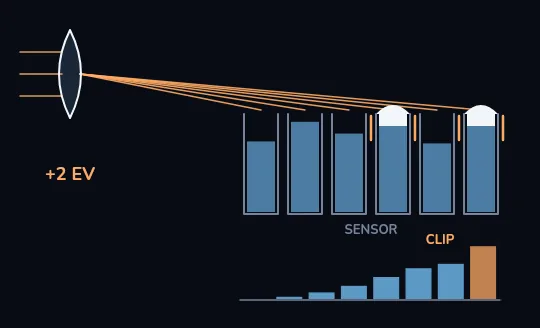
+2 EV: the brightest wells overflow Two stops more light than a good exposure, four times as much. Most wells now sit about 70 to 95 percent full, but the two brightest overflow and turn pure white, and the histogram piles into a spike at its right edge marked CLIP. What spilled over is gone and can't be brought back in editing.
Check yourself
In the +2 EV frame, the spike marked CLIP at the right edge of the histogram stands for pixels that recorded pure white and lost their detail.
Show the answer
True
True. The right edge of a histogram is the brightest possible value. A tall spike pressed against it means many pixels hit that ceiling, like the two overflowing wells, and whatever detail was there is gone.
THE UNIT
Photographers count light in stops
A stop is a doubling or a halving of light. "One stop brighter" means twice the light, two stops means four times, three stops eight times. Every control that changes brightness is marked in stops, so the unit lets you compare them directly. Three things decide exposure: how big the opening in the lens is (aperture, lesson 2), how long it stays open (shutter speed, lesson 3) and how much the signal is amplified (ISO, lesson 4). The EV steps on a phone's or camera's exposure slider are stops too.
+1 EV on your phone's slider asks for twice the light. −2 EV asks for a quarter of it, exactly the dark frame you just saw.
Check yourself
Reza's camera tells him his next shot will get "one stop more light" than the last. What does that mean?
- About 10 percent more light
- One unit more on a scale from 1 to 100
- Half as much light
- Twice as much light
Show the answer
Twice as much light
Right. A stop is a doubling. One stop more is twice the light, two stops more is four times.
WHY SNOW COMES OUT GREY
The meter aims for average
Your phone or camera measures the light and picks an exposure that makes the scene come out, on average, mid-grey. That works for most scenes, which have a mix of darks and brights. It fails for scenes that are mostly bright or mostly dark: snow and white sand come out a dull grey, and a black cat in a dim room comes out washed-out grey too. The fix is exposure compensation: about +1 to +2 EV for snow or a bright beach, and about −1 EV for a dark scene you want to stay dark.
Mina photographs a snowy park and it looks like dirty slush. She drags the slider to about +1.5 EV and the snow turns white again, with its texture still there.
Setting exposure yourself
- Phone: tap the subject
Tap the face or thing that matters. Most phones set both focus and exposure from that spot.
- Phone: drag the sun icon
A small sun or slider appears next to the focus box. Drag it up to brighten, down to darken. These are EV steps.
- Phone: long-press to lock
Hold your finger on the subject until you see AE/AF LOCK or a lock icon. Now the exposure stays put when you reframe.
- Camera: use the ± control
The exposure compensation button or dial, marked ±, does the same job as the phone's slider in any auto or semi-auto mode.
- Check the bright parts
Look at the sky, a white shirt or a lamp. If they have turned into flat white shapes, pull the exposure down a little.
Check yourself
Nima photographs a snowy field on auto and the snow comes out a dull grey. What's the best fix?
- Add exposure compensation, about +1 to +2 EV, because the meter aimed for mid-grey
- Pull the exposure down to about −2 EV so the snow doesn't clip
- Turn the phone's screen brightness up before taking the picture
- Nothing: snow always photographs as grey
Show the answer
Add exposure compensation, about +1 to +2 EV, because the meter aimed for mid-grey
Right. The meter tried to make the bright scene average, which means grey. Telling it to go about 1 to 2 stops brighter puts the snow back where it belongs, near white.
READ THE GRAPH, NOT THE SCREEN
The histogram
A histogram is a graph of how many pixels have each brightness: darkest on the left, brightest on the right. Bunched against the left edge means underexposed; piled against the right edge means clipped highlights. There's no single correct shape: a night street should lean left, a snowy field should lean right. Many phones show it in Pro or Manual mode, and cameras show it in live view or playback. It's more honest than your screen, which looks too bright in a dark room and too dark in bright sun.
A photo that looked fine on the screen at a late-night dinner can turn out much darker on a laptop the next morning. The histogram would have shown it leaning hard to the left.
Check yourself
- Sara photographs a quiet street at night, lit by a few lamps. Its histogram is piled up on the left with a small bump on the right for the lamps, and the photo looks just like the scene felt.
- Sara photographs her friend's face at lunch on a sunny terrace. Its histogram is also piled up on the left with almost nothing on the right, and the face looks murky.
Both histograms lean left. Why is only one of them a problem?
- Histograms only work at night
- A left-leaning histogram is fine when the scene really is dark; in a bright daytime scene it means the photo is underexposed
- The second photo has too much light
- The first histogram is wrong because night photos should be centred
Show the answer
A left-leaning histogram is fine when the scene really is dark; in a bright daytime scene it means the photo is underexposed
Exactly. There's no one correct histogram shape. Compare it with the scene: a dark street should lean left, a sunny lunch shouldn't. The second photo needs more light, for example +1 EV.
Lesson recap
- The sensor is a grid of millions of tiny points; each records how much light reached it.
- Exposure is how much light the sensor collects: too little is dark and murky, too much turns bright areas pure white.
- Clipped highlights can't be recovered; dark shadows can often be lifted a little. When in doubt, protect the bright parts.
- A stop is a doubling or halving of light, and EV steps are stops.
- The meter aims for mid-grey, so add about +1 to +2 EV for snow and about −1 EV for a dark scene you want dark.
- Trust the histogram over the screen, and judge its shape against the scene.