
Your first program
A program is a list of instructions Python runs from top to bottom. Write your first lines with print, and use Python as a calculator that knows the order of operations.
WHAT A PROGRAM IS
Instructions, run from top to bottom
A program is a sequence of instructions. Python, the interpreter, reads them one at a time: it starts at the first line, does exactly what it says, then moves to the next. Order matters, so swapping two lines can change what happens. And Python never guesses what you meant; it does what you wrote.
A program with three lines that print Hello, then 7, then Bye shows them in exactly that order, one per line.
print("Hello")
print(7)
print("Bye")Hello
7
ByeEach print shows one value and then starts a new line, so you get three lines. The quotes around Hello aren't printed; they only mark where the text starts and ends. The 7 needs no quotes because it's a number.
Check yourself
Omid writes print("2 + 3"). What appears on the screen?
- 5
- 2 + 3
- "2 + 3"
- An error
Show the answer
2 + 3
Right. Inside quotes, 2 + 3 is just text, three characters and two spaces, so print shows it exactly as written, without the quotes.
PYTHON AS A CALCULATOR
Seven operators cover everyday maths
+ adds, - subtracts and multiplies (a star, not the letter x). / divides and always gives a decimal, even when the answer is whole. // divides and keeps only the whole-number part, % gives the remainder, and * raises to a power.
10 / 2 is 5.0, 7 / 2 is 3.5, 7 // 2 is 3, 7 % 2 is 1 and 2 ** 3 is 8.
print(10 / 2)
print(7 / 2)
print(7 // 2)
print(7 % 2)
print(2 ** 3)5.0
3.5
3
1
8Line by line: division always gives a decimal, so 10 / 2 prints 5.0, not 5. Then 7 split into 2 is 3.5; its whole-number part is 3, with 1 left over. The last line is 2 to the power 3, which is 2 * 2 * 2.
Check yourself
print(7 // 2)
print(7 % 2)
3 13.5 13 0.53.5 0
Show the answer
3
1ORDER OF OPERATIONS
Multiplication before addition, just like in maths
When a line has more than one operator, Python doesn't simply go left to right. It does *, /, // and % before + and -, the same rule you learned at school. Anything in round brackets is worked out first, so brackets are how you say which part should happen first, and they make your intent easy to read.
2 + 3 * 4 is 2 + 12, which is 14. (2 + 3) * 4 is 5 * 4, which is 20.
Check yourself
print(2 + 3 * 4)1420242 + 3 * 4
Show the answer
14Step through it
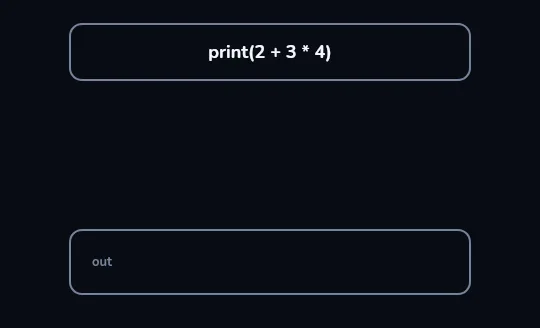
Python reads print(2 + 3 * 4)The code strip at the top holds one line,
print(2 + 3 * 4), and the out panel below it is still empty. Before print can show anything, Python has to work out the one value inside the brackets.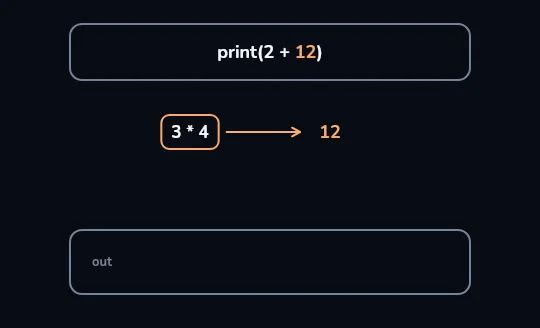
Multiplication first: 3 * 4becomes 12Python does the multiplication first, just as in maths:
3 * 4is pulled out and turns into 12. The strip now readsprint(2 + 12), and the out panel is still empty.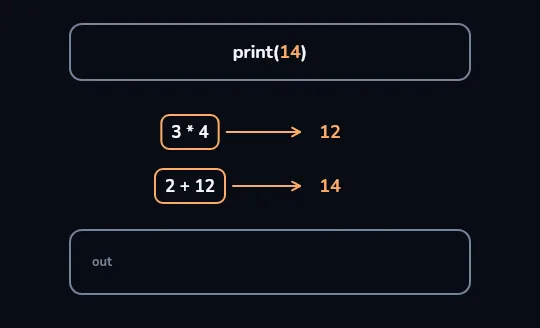
Then the addition: 2 + 12becomes 14With the multiplication done, only the addition is left:
2 + 12turns into 14, right under the first step. The strip now readsprint(14), a single value ready to be shown.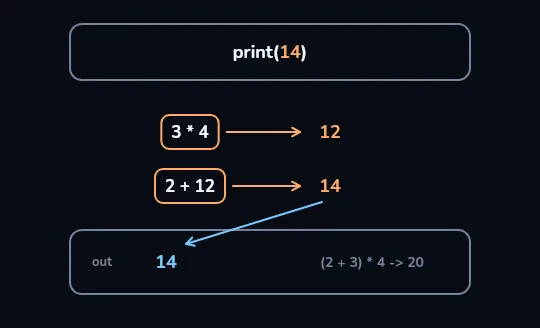
print shows 14 The 14 travels down the arrow into the out panel: that's what you see on the screen. Beside it, dimmed, is what brackets would change:
(2 + 3) * 4does the addition first and gives 20.
Check yourself
print(10 / 2) prints 5.
Show the answer
False
False. It prints 5.0. The / operator always gives a decimal number, even when the division comes out whole. If you want a whole number, 10 // 2 prints 5.
print(2 + 3)
print(4 * 5)
print(10 - 7)5
20
3Three lines, three results, in the same order as the code. Try it yourself: change a number or an operator and run it again, and predict the output before you tap run.
Check yourself
print("Start")print(6 * 7print("End")
Show the answer
The bug is on line 2.
Found it. Line 2 opens a bracket and never closes it, so Python stops with a SyntaxError before printing anything at all. It should be print(6 * 7).
Lesson recap
- A program is a list of instructions that Python, the interpreter, runs one at a time from top to bottom.
print(...)shows a value and starts a new line; text needs quotes, numbers don't, and the quotes aren't printed./always gives a decimal (10 / 2 is 5.0);//keeps the whole part,%gives the remainder,**is a power.*and/happen before+and-, so2 + 3 * 4is 14; brackets go first, so(2 + 3) * 4is 20.- A missing bracket or an x for multiply is a SyntaxError; text without quotes is a NameError.