
Functions: name a job, reuse it
A function packages steps under a name so you can run them whenever you need. Pass in values as parameters, send a result back with return, and see what happens on the call stack when one function calls another.
DEFINING A FUNCTION
def gives a name to some steps
def greet(name): starts a function definition: the keyword def, the function's name, brackets with the names of its inputs, and a colon. The indented lines under it are its body. Defining a function only stores those steps under the name; nothing runs yet. The body runs when you call the function by writing its name with brackets, like greet("Sara"), and it runs again every time you call it.
A recipe card in a drawer: writing it down doesn't cook anything. Cooking happens each time someone picks the card up and follows it.
def greet(name):
    print("Hello, " + name)

greet("Sara")
greet("Omid")Hello, Sara
Hello, OmidThe def block printed nothing on its own. Each of the last two lines calls greet, and each call runs the body once with a different name.
Check yourself
Defining a function with def runs its body straight away.
Show the answer
False
False. def only stores the steps under a name. The body runs when you call the function, for example greet("Sara"), and runs again on every call.
Parameter and argument
A parameter is a name in the definition's brackets: in def area(w, h):, w and h are parameters. An argument is the value you pass in when you call it: in area(3, 4), 3 and 4 are arguments. On each call the arguments are matched to the parameters in order, so w gets 3 and h gets 4.
area(3, 4) and area(4, 3) give the same area here, but for a function like minus(a, b), swapping the arguments changes the answer.
def area(w, h):
    return w * h

result = area(3, 4)
print(result)
print(area(2, 5) + 1)12
11return sends the value back to the place that called the function. area(3, 4) becomes 12, which is stored in result; area(2, 5) becomes 10, and the + 1 is done after it comes back.
Check yourself
def double(n):
    return n * 2

print(double(4) + 1)91085
Show the answer
9Right. double(4) returns 8, and then 8 + 1 is 9.
Step through it
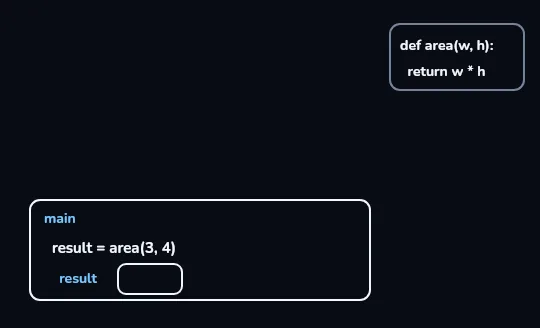
main reaches result = area(3, 4) The program's own frame, main, sits at the bottom of the stack with the line result = area(3, 4) and an empty box for result. The definition of area is parked at the top right. main has to pause here until area sends an answer back.
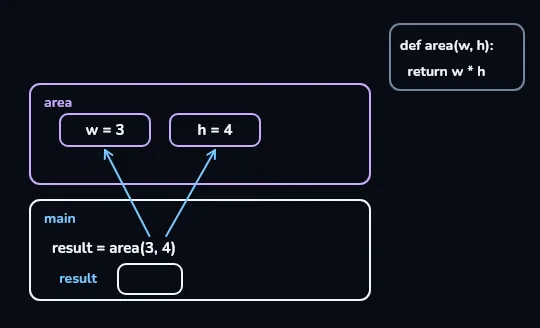
The call pushes an area frame: w = 3, h = 4 Calling area puts a new frame named area on top of main. Arrows carry the arguments 3 and 4 from the call line into its boxes, in order, so the parameters become w = 3 and h = 4. These boxes belong to this one call.
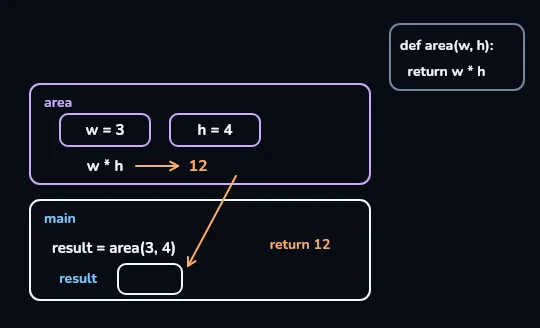
w * h becomes 12, and return 12 goes back Inside the area frame, w * h is worked out as 12. The return 12 arrow runs down out of the frame toward the empty result box in main: return sends the value back to whoever made the call.
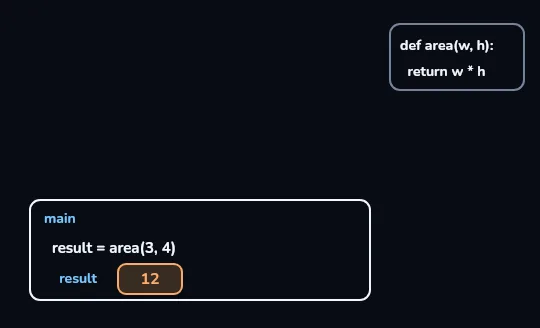
The area frame is gone; result is 12 The area frame has faded off the stack, and its w and h went with it: they were local to that call. Only main is left, and its result box now holds 12, so the program carries on from the line after the call.
Check yourself
Match each word to what it means
Show the answer
- def → Starts a function definition
- Parameter → A name in the definition's brackets, like w
- Argument → A value passed in the call, like 3
- return → Sends a value back to the caller and ends the function
print shows, return hands back
print inside a function
Puts the value on the screen for a person to read. The program itself gets nothing back, so you can't store it, add to it or pass it on.
return inside a function
Hands the value back to the line that called the function, where it can be stored (result = area(3, 4)), used in a sum or printed.
A function with no return gives back None, Python's value for "nothing".
def greet(name):
    print("Hi " + name)

x = greet("Sara")
print(x)Hi Sara
NoneThe first line of output comes from the print inside greet. greet has no return, so x gets None, and print(x) shows it. This is the most common function mix-up for beginners.
Check yourself
def area(w, h):print(w * h)x = area(3, 4)print(x + 1)
Show the answer
The bug is on line 2.
Right. area prints 12 but returns nothing, so x is None and x + 1 fails with a TypeError. Change print(w * h) to return w * h.
LOCAL VARIABLES
What happens in a function stays in the function
Parameters and any variable you create inside a function are local: they exist only while that call is running, in its own frame on the stack. When the function returns, the frame is removed and they're gone. So after area(3, 4), writing print(w) outside the function is a NameError: w was never a name in main. If you need a value outside, return it.
Two calls, area(3, 4) and area(2, 5), each get their own w and h. They never see or overwrite each other's.
Why bother with functions
- Write once, use many times. minutes(3) and minutes(5) reuse the same def minutes(hours): return hours * 60.
- One place to fix. If the formula was wrong, you correct it in the def and every call is fixed.
- A good name explains the code. to_toman(50000) says what it does; 50000 // 10 makes you guess.
- Defaults are optional extras. def greet(name="friend"): lets you call greet() with no argument.
Check yourself
Reza defines def area(w, h): return w * h, runs result = area(3, 4), and then, outside the function, writes print(w). What happens?
- It prints 3, the last value w had
- It prints 12
- A NameError, because w only existed inside that call
- It prints None
Show the answer
A NameError, because w only existed inside that call
Right. w was a local variable in the area frame. That frame was removed when area returned, so in main there is no name w.
Lesson recap
- def name(params): stores steps under a name; the body runs only when you call name(args).
- Parameters are the names in the definition; arguments are the values you pass, matched in order.
- return hands a value back to the caller; a function without return gives back None.
- print shows a value to a person; return gives it to the program to store or use.
- Each call gets its own frame on the call stack, with local variables that disappear when it returns.