
Lists: many values in one place
A list keeps values in order under one name. Get items by position, add and change them, and learn the error you get when you ask for a position that isn't there.
LISTS
Many values, in order, under one name
A list is written with square brackets and commas between the items: scores = [8, 5, 9]. The items keep the order you wrote them in. They can be any type, numbers, strings or a mix, and len(scores) tells you how many there are. Printing a list shows its brackets too.
names = ["Sara", "Omid"] is a list of two strings; len(names) is 2.
scores = [8, 5, 9]
names = ["Sara", "Omid"]
print(scores)
print(names)
print(len(scores))[8, 5, 9]
['Sara', 'Omid']
3Notice the second line of output: Python prints the strings inside a list with single quotes, even though the code used double quotes. It's the same text either way.
Check yourself
scores = [8, 5, 9]
print(scores[1])589[8, 5]
Show the answer
5POSITIONS
Indexes start at 0, and the last one is len - 1
Lists count positions from 0, exactly like strings. In scores = [8, 5, 9], scores[0] is 8 and scores[2] is 9, and scores[-1] is always the last item. Three items means positions 0, 1 and 2, so the last index is one less than the length. Ask for scores[3] and the program stops with IndexError: list index out of range. This off-by-one slip is the most common list mistake there is.
Slices work too: scores[0:2] is [8, 5].
Check yourself
scores[-1] gives the last item of the list, however long the list is.
Show the answer
True
True. Negative positions count back from the end, so -1 is always the last item. With [8, 5, 9] it's 9; after appending 7 it would be 7.
Step through it
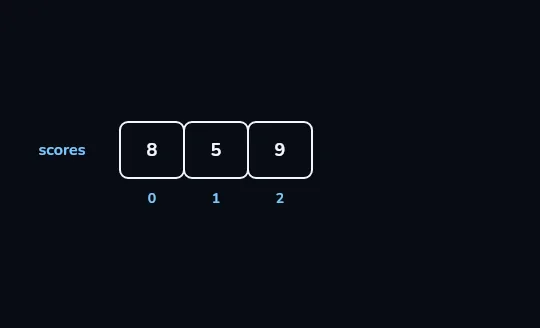
scores = [8, 5, 9]: three cells, numbered from 0The list is drawn as three joined cells holding 8, 5 and 9, with the name scores on the left. Under them are their positions, 0, 1 and 2: a list is a row of values under one name, numbered from 0.
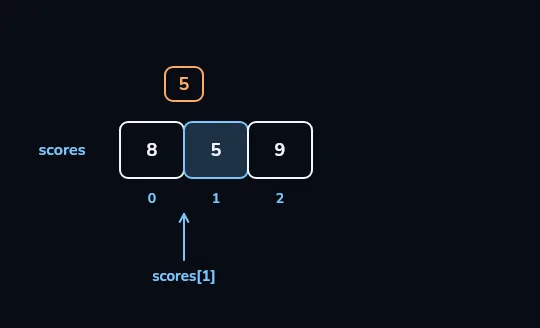
scores[1]lifts out 5The arrow marked
scores[1]points up at the middle cell, which lights, and its value, 5, is lifted out above it. The number in square brackets picks the item at that position, and position 1 is the second item.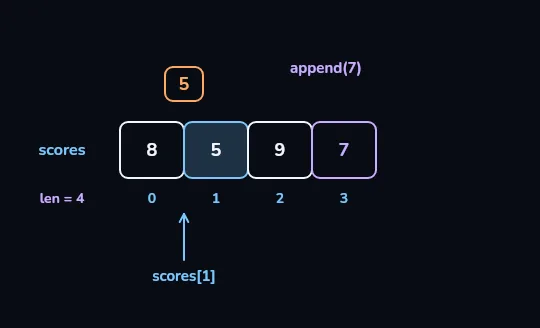
append(7)adds a fourth cellappend(7)adds a new cell holding 7 at the right end, and the index 3 appears under it. A counter on the left now reads len = 4: append adds one item at the end, and the length grows by one.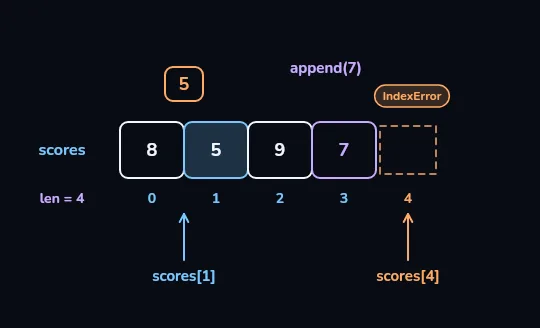
scores[4]points past the end: IndexErrorA second arrow,
scores[4], points at a dashed, empty cell after the 7, tagged IndexError in orange. With four items the positions are 0 to 3, so the last index is len minus one; asking for 4 is an error.
Check yourself
scores = [8, 5, 9]
scores.append(7)
print(len(scores))43710
Show the answer
4CHANGING A LIST
Unlike strings, lists can change
You can replace an item by assigning to its position: scores[1] = 6. append() adds an item at the end, remove(9) deletes the first 9 it finds, and pop() takes the last item off and hands it back. A few helpers read a list without changing it: sum(), max() and min(), and in to check whether a value is there.
9 in scores is True for [8, 5, 9]; sum(scores) is 22.
scores = [8, 5, 9]
scores[1] = 6
scores.append(7)
print(scores)
print(9 in scores)
print(sum(scores))
print(max(scores))[8, 6, 9, 7]
True
30
9Line 2 replaces the 5 with a 6, and line 3 adds 7 at the end, so the list is now [8, 6, 9, 7]. Then in, sum() and max() read it: 9 is there, the items add up to 30, and the biggest is 9.
items = ["milk", "eggs"]
items.append("tea")
print(items)
print(len(items))
print(items[-1])['milk', 'eggs', 'tea']
3
teaA shopping list that grows. After append, tea is the third item, at index 2, which is also items[-1]. The list printout uses single quotes, as before.
Check yourself
items = ["milk", "eggs"]
items.____("tea")
print(items)
append · add · len · pop
Show the answer
append
Right. append() adds tea at the end, and the list prints as ['milk', 'eggs', 'tea'].
Check yourself
names = ["Sara", "Omid", "Negar"]print(names[3])
Show the answer
The bug is on line 2.
Found it. Three names sit at positions 0, 1 and 2, so names[3] is past the end: IndexError: list index out of range. The last name is names[2], or names[-1].
Lesson recap
- A list keeps values in order under one name:
scores = [8, 5, 9]. - Positions start at 0 and
[-1]is the last item; the last index is alwayslen(scores) - 1. - Asking for a position past the end, like
scores[3]here, is an IndexError, the classic off-by-one. - Lists can change:
scores[1] = 6replaces,append()adds at the end,remove()andpop()take items out. in,sum(),max()andmin()read a list;sorted()returns a new list, whilesort()changes it in place.