
Dictionaries: look it up by name
A dictionary stores pairs of key and value, so you find things by a name instead of a position. Add and update entries, loop over them, and avoid the KeyError with get.
KEY AND VALUE
Pairs in curly braces
prices = {"tea": 3, "cake": 5, "milk": 2} makes a dictionary with three pairs. Each pair is a key, a colon, and its value, and commas separate the pairs. You look a value up by putting its key in square brackets: prices["cake"] is 5. Keys are unique: one key, one value. len(prices) counts the pairs.
A phone book is a dictionary: the name is the key, the number is the value. You never ask for "the 214th number"; you ask for Reza's.
prices = {"tea": 3, "cake": 5, "milk": 2}
print(prices["cake"])
print(prices["tea"] * 2)
print(len(prices))5
6
3prices["cake"] is just a number once it's looked up, so you can do maths with it. len counts three pairs, not six items.
Check yourself
With prices = {"tea": 3, "cake": 5, "milk": 2}, prices[0] gives the first pair, tea.
Show the answer
False
False. A dictionary has no positions. prices[0] looks for a key that is the number 0, finds none, and raises KeyError: 0. To get tea's price, ask by its key: prices["tea"].
Step through it
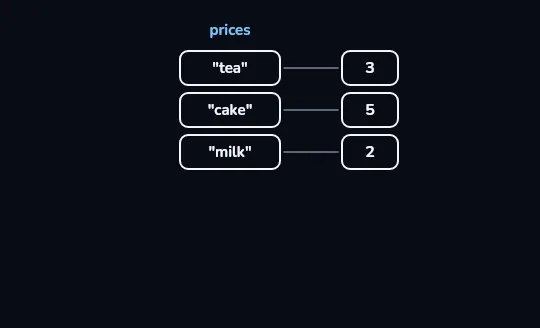
prices: three keys, three values The dictionary prices drawn as a two-column table. On the left are the keys "tea", "cake" and "milk"; on the right, joined by a short line, the value that belongs to each: 3, 5 and 2.
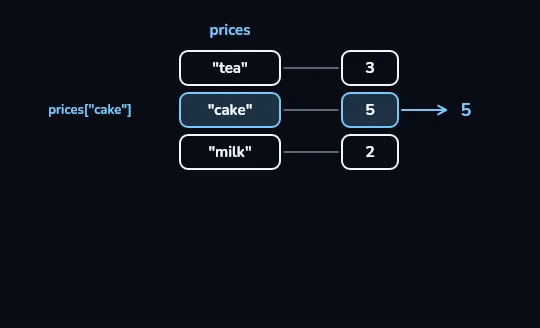
prices["cake"] lights cake and lifts out 5 The lookup prices["cake"] finds the row whose key is "cake". That key and its value light up, and 5 is lifted out with an arrow. Python found it by the key's name, without counting rows.
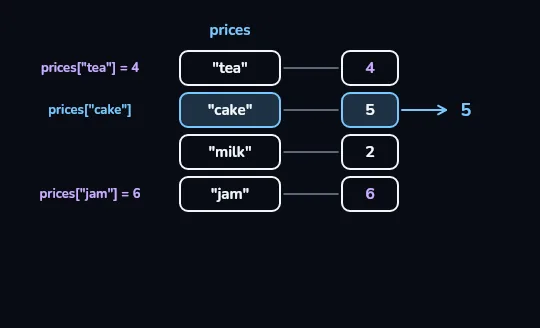
tea updated to 4, jam added with 6 prices["tea"] = 4 replaces tea's old value, so its row now shows 4 instead of 3. prices["jam"] = 6 uses a key that wasn't there, so a new row "jam" with 6 appears at the bottom. Same syntax both times: update if the key exists, add if it doesn't.
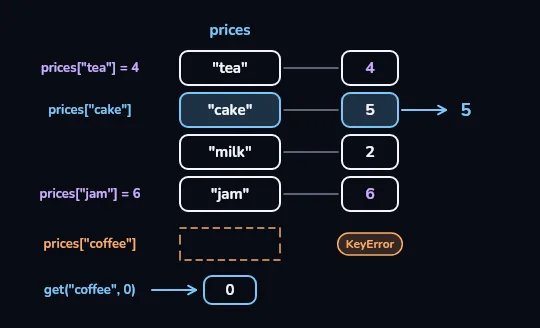
prices["coffee"] is a KeyError; get gives 0 prices["coffee"] searches the keys and ends at an empty, dashed slot: there is no "coffee", so square brackets raise a KeyError. Below it, prices.get("coffee", 0) asks the same question but hands back the default, 0, instead of stopping the program.
Check yourself
prices = {"tea": 3, "cake": 5}
prices["tea"] = 4
print(prices["tea"] + prices["cake"])9812KeyError: 'tea'
Show the answer
9Right. The second line replaces tea's 3 with 4, so it's 4 + 5 = 9.
prices = {"tea": 3, "cake": 5}
prices["tea"] = 4
prices["jam"] = 6
print(prices){'tea': 4, 'cake': 5, 'jam': 6}Printing a whole dictionary shows every pair, with strings in single quotes. Since Python 3.7 a dictionary keeps the order pairs were added, so jam comes last.
prices = {"tea": 3, "cake": 5}
print("coffee" in prices)
print(prices.get("coffee", 0))
print(prices.get("cake", 0))
print(prices.get("coffee"))False
0
5
NoneNone of these lines crashes. get only uses the default when the key is missing; for cake it returns the real value, 5.
Check yourself
prices has tea and cake but no coffee. What does prices.get("coffee", 0) give?
- A KeyError
- 0
- None
- False
Show the answer
0
Right. The key is missing, so get hands back the default you gave it, 0.
prices = {"tea": 3, "cake": 5}
for item, price in prices.items():
print(item, price)tea 3
cake 5items() gives the pairs one at a time, and the loop unpacks each pair into two names. A plain for k in prices: loops over the keys only.
The counting pattern
- Start with an empty dictionary
counts = {} before the loop. It will hold word: how many times.
- Loop over the items
for w in words: visits "tea", "cake", "tea" in turn.
- Add one to that word's count
counts[w] = counts.get(w, 0) + 1. The first time a word appears, get gives 0, so it becomes 1; after that it adds to what's there.
- Print after the loop
print(counts) shows {'tea': 2, 'cake': 1}. The final project uses this same shape to total expenses.
Check yourself
words = ["a", "b", "a", "a"]
counts = {}
for w in words:
    counts[w] = counts.get(w, 0) + 1
print(counts)
{'a': 3, 'b': 1}{'a': 1, 'b': 1}{'a': 3, 'b': 1, 'a': 1}KeyError: 'a'
Show the answer
{'a': 3, 'b': 1}Right. a is seen three times and b once. get(w, 0) is what avoids the KeyError the first time each letter appears.
List or dictionary?
List
When order and position matter: a queue, steps in order, scores in the order they were taken.
You ask "what's item 0?"
Dictionary
When you look things up by a name: prices by item, phone numbers by person, counts by word.
You ask "what's cake?"
Check yourself
Which fits each job better, a list or a dictionary?
- A shopping list in the order you'll walk the shop
- Friends' phone numbers, found by name
- Exam scores in the order they were taken
- The price of each item on a café menu
- How many times each word appears in a text
Show the answer
List: A shopping list in the order you'll walk the shop, Exam scores in the order they were taken
Dictionary: Friends' phone numbers, found by name, The price of each item on a café menu, How many times each word appears in a text
Lesson recap
- A dictionary holds key: value pairs in curly braces, and prices["cake"] finds a value by its key.
- There are no positions: prices[0] looks for a key 0, not the first pair.
- Assigning to a key updates it if it exists and adds it if it doesn't; keys are unique.
- A missing key in square brackets is a KeyError; use in to check, or get(key, default) for a safe answer.
- Loop over pairs with for k, v in d.items(), and count things with d[k] = d.get(k, 0) + 1.