
Machine code: programs as numbers
Follow one line of code as a compiler turns it into simple instructions, then into the plain numbers a processor actually reads from memory.
THE MENU
A processor knows a fixed list of simple instructions
A CPU can't do "send an email" or even "c = a + b" in one go. It knows a fixed list of small instructions: load a value from memory into a register, store a register into memory, add, subtract, compare, jump to another instruction. That list is its instruction set. Most PCs use one called x86-64; phones and newer Macs use ARM. Our toy processor has just LOAD, ADD, STORE and JUMP.
Everything an app does, from drawing a button to playing a song, is built out of millions of these tiny steps.
Assembly language
A readable way of writing a processor's instructions, one per line, with short names instead of raw numbers. Each line matches one machine code instruction, the number the CPU actually reads. Square brackets mean "the memory address".
LOAD R1, [20] means: copy the value stored at memory address 20 into register R1. STORE R3, [22] goes the other way: copy R3 into address 22.
Check yourself
In our toy processor, what does LOAD R1, [20] do?
- Puts the number 20 into register R1
- Copies the value stored at memory address 20 into register R1
- Copies R1 into memory address 20
- Jumps to instruction number 20
Show the answer
Copies the value stored at memory address 20 into register R1
Right. The brackets mean "address", so it fetches whatever is stored at address 20, in our example 7, and puts it in R1.
c = a + b        ; a = [20], b = [21], c = [22]

LOAD  R1, [20]   ; R1 = 7
LOAD  R2, [21]   ; R2 = 5
ADD   R3, R1, R2 ; R3 = 12
STORE R3, [22] ; address 22 = 12address 22 now holds 12One short line became four instructions: bring both values into registers, add them, and write the answer back to memory. A whole app is millions of instructions like these.
Check yourself
Put the toy instructions for c = a + b in the order the processor must run them. Load a (address 20) before b (address 21).
Show the answer
LOAD R1, [20]
LOAD R2, [21]
ADD R3, R1, R2
STORE R3, [22]
Step through it

One line of code A single line of code in a box: add a and b, and keep the answer in c. This is how a person writes it. The processor can't read it like this yet.
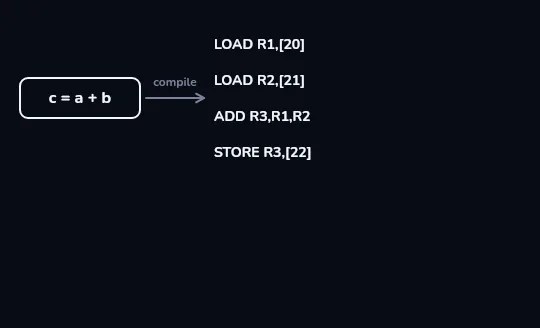
Compiled into four instructions An arrow labelled compile leads to four stacked instructions: LOAD R1,[20], LOAD R2,[21], ADD R3,R1,R2 and STORE R3,[22]. The compiler has broken one line into steps the processor knows.
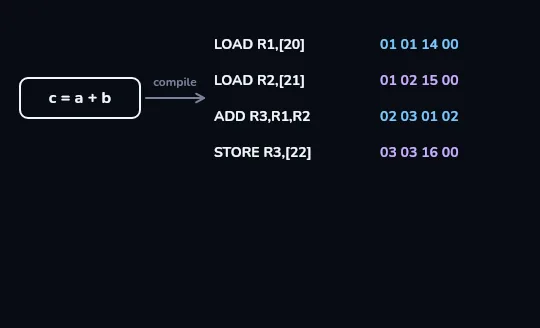
Each instruction is four bytes Each instruction gets its bytes, written in hex: an operation number first (LOAD = 01, ADD = 02, STORE = 03), then the registers and address it uses. LOAD R1,[20] becomes 01 01 14 00, since 20 is 14 in hex. These codes are invented for our toy; real processors use different numbers but the same idea.
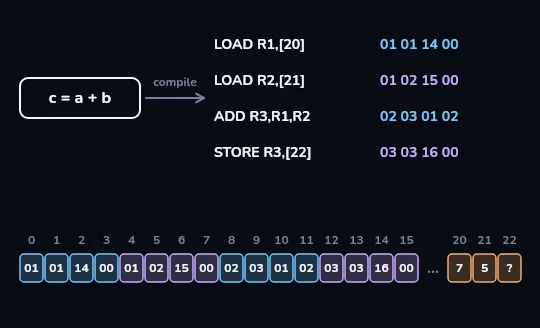
Program and data in one memory A strip of numbered memory cells. Addresses 0 to 15 hold the program's 16 bytes, four per instruction. After a small gap, address 20 holds 7, address 21 holds 5 and address 22 is still unknown. Program and data sit side by side, all as numbers, waiting for the processor.
Check yourself
A program's instructions are kept in a special kind of memory, separate from the data they work on.
Show the answer
False
False. As the memory strip showed, instructions and data are both just bytes in the same RAM: addresses 0 to 15 held the program, 20 to 22 held a, b and c. That's the stored-program idea from lesson 1.
Two ways to get from your code to machine code
Compiler
Translates the whole program into machine code ahead of time, producing a file you can run. C, Go and Rust usually work this way. Running it later is fast, because the translating is already done.
Interpreter
A program that reads your code and carries it out as it goes, line by line, without producing a machine-code file first. Standard Python works this way. The interpreter itself is machine code running on the CPU.
Check yourself
Negar compiles her C program. What does the compiler produce?
- A shorter version of her C code
- Machine code for a particular instruction set
- A list of the program's variables and their values
- Python code the CPU can read directly
Show the answer
Machine code for a particular instruction set
Right. A compiler turns source code into machine code, the numbers for one particular instruction set such as x86-64 or ARM.
WHY THERE ARE TWO DOWNLOADS
Machine code only fits one kind of chip
The same number means different things in different instruction sets. Machine code built for x86-64 is gibberish to an ARM processor, and the other way round. That's why some apps offer separate downloads for ARM and x86, and why a translation layer, like Apple's Rosetta 2 on newer Macs, is needed to run one on the other.
In our toy, 02 means ADD. On another processor, the same byte 02 could mean something else entirely. The bytes only make sense to the chip they were written for.
Check yourself
Why won't a program compiled for an x86-64 PC run directly on an ARM phone?
- The phone's screen is too small for it
- ARM processors can't run compiled programs, only Python
- Its machine code uses a different instruction set, so the numbers mean different things to the phone's chip
- The phone has less storage than the PC
Show the answer
Its machine code uses a different instruction set, so the numbers mean different things to the phone's chip
Right. The program is numbers written for x86-64. An ARM chip reads the same numbers as different instructions, so it needs a version compiled for ARM, or a translation layer.
Worth remembering
- The CPU never sees Python or JavaScript. Whatever language you write in, in the end only machine code runs.
- One line of code can become many instructions; a whole app is millions of them.
- Instructions and data are both just bytes in the same memory.
- Machine code belongs to one instruction set, which is why apps are built separately for x86 and ARM.
Lesson recap
- A processor knows a fixed instruction set of simple steps: load, store, add, compare, jump.
- Assembly writes those steps with readable names; LOAD R1, [20] copies the value at address 20 into R1.
- c = a + b becomes LOAD, LOAD, ADD, STORE, and each instruction is stored as a few bytes of machine code.
- A compiler translates code into machine code ahead of time; an interpreter carries code out as it reads it.
- Program and data sit side by side in memory as numbers, and machine code only makes sense to its own kind of chip.