
Processes: one CPU, many programs
Meet the operating system and the process, and see how a scheduler switches a core between programs so fast that they all seem to run at once.
THE MANAGER
The operating system and its kernel
The operating system (Windows, macOS, Linux, Android, iOS) is the program that manages the hardware for every other program. Its core part, the kernel, runs with full control of the machine. Apps run with restricted rights: they can't touch the disk, the network or the screen directly. Instead they ask the kernel to do it for them, and that request is called a system call.
When a notes app saves a file, it doesn't write to the SSD itself. It makes a system call, "write these bytes to notes.txt", and the kernel does the rest.
Check yourself
A music app wants to read a song file from the disk. How does it do that?
- It sends instructions straight to the SSD itself
- It makes a system call, asking the kernel to read the file for it
- It waits until the kernel is switched off
- It copies itself into the kernel first
Show the answer
It makes a system call, asking the kernel to read the file for it
Right. Apps run with restricted rights, so for anything involving hardware, like reading a file, they ask the kernel with a system call.
Process
A running program: its machine code, its own memory, and the saved state of its registers, including its program counter. The kernel gives each process a number, its PID (process ID). The same app opened twice can be two separate processes. Task Manager on Windows and Activity Monitor on a Mac list them, and an ordinary computer has hundreds.
A browser, a music player and a text editor running together are three processes, say PIDs 101, 102 and 103.
Program or process?
Program
A file on the disk, full of machine code.
It does nothing by itself; it just sits there.
Example: the text editor app in your applications folder.
Process
A running copy of that program, loaded into RAM, with its own memory and registers.
Open the editor twice and there may be two processes of the same program.
Close it and the process is gone; the program file stays.
Check yourself
Sina opens two separate windows of the same text editor. Each can be its own process, with its own memory and its own PID.
Show the answer
True
True. A process is a running copy of a program, so one program can have several processes at once, each with its own memory, saved registers and PID. (Some apps choose to share one process between windows, but the idea holds.)
Step through it
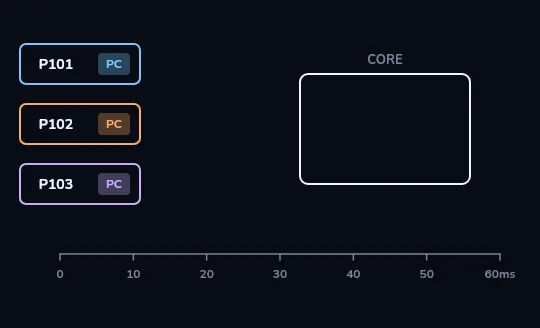
Three processes, one core On the left, three processes wait in line: P101 the browser, P102 the music player and P103 the editor, each with a small chip holding its saved registers and program counter. On the right is one empty processor core, and along the bottom a timeline from 0 to 60 milliseconds. The scheduler has to share that one core among all three.
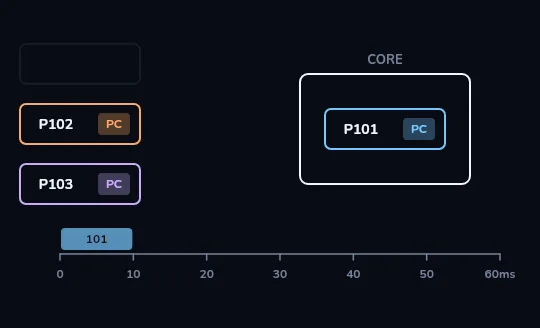
P101 gets a 10 ms slice The scheduler picks the browser, P101, and moves it onto the core. The first 10 milliseconds of the timeline fill in the browser's colour. That's its time slice: a few milliseconds of real work before someone else gets a turn.
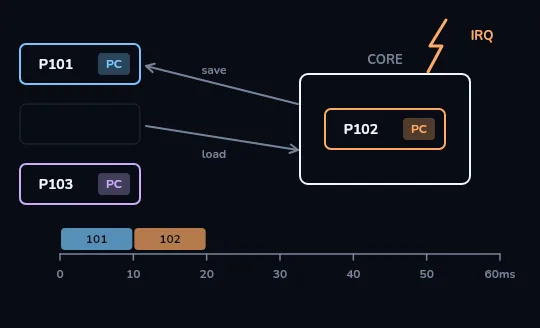
Timer interrupt: save P101, load P102 A hardware timer fires an interrupt, marked IRQ, and the core jumps into the kernel. The kernel saves the browser's registers and program counter back into P101's chip, and loads the music player's saved registers from P102's. From 10 to 20 milliseconds the timeline fills in P102's colour, and the music carries on exactly where it left off.
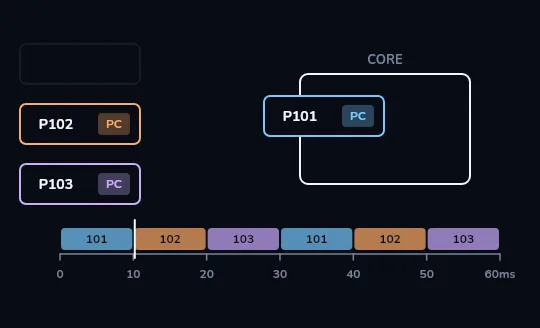
Round and round: 101, 102, 103, 101, 102, 103 The pattern repeats: 101, 102, 103, then 101, 102, 103 again, filling the timeline to 60 milliseconds. A playhead sweeps along it, and whichever process it's over moves into the core. In one second each process gets its turn dozens of times, far too fast for you to notice, so all three seem to run at once.
Check yourself
When the timer interrupt stopped the browser (P101), what did the kernel have to save so the browser could later continue exactly where it left off?
- The browser's whole program file, copied back to the disk
- The browser's registers, including its program counter
- Nothing, because the browser starts again from its first instruction
- Only the address of the website it had open
Show the answer
The browser's registers, including its program counter
Right. The registers and the program counter are the processor's whole view of where a program is and what it's holding. Save them, and the process can later pick up exactly where it stopped. That save-and-load is a context switch.
THE MACHINERY
Interrupts, context switches and waiting
An interrupt is a signal that makes the processor stop what it's doing and run a bit of kernel code. The timer sends one every few milliseconds, which is how the scheduler gets its chance to switch. Saving one process's registers and loading another's is a context switch; it costs a little time, on the order of microseconds. Devices interrupt too: a key press or a network packet arriving lets the kernel respond straight away. And most processes are waiting most of the time, for a key, the disk or the network, so the scheduler simply skips them until there's something to do.
Of the hundreds of processes on a laptop, usually only a handful actually want the processor at any given moment.
Check yourself
Match each term to what it means
Show the answer
- Kernel → The core of the operating system, with full control of the machine
- Process → A running program with its own memory and saved registers
- Time slice → The few milliseconds a process gets on a core before a switch
- Context switch → Saving one process's registers and loading another's
- System call → A program asking the kernel to do something for it
What to take away
- A single core runs one instruction stream at a time; taking turns fast is what makes it look like more.
- Each turn is a time slice of a few milliseconds; a timer interrupt ends it.
- A context switch saves the registers and program counter, so nothing is lost between turns.
- With several cores, several processes really do run at the same moment, and the scheduler shares all of them.
Check yourself
- An old laptop with a single core runs a browser, a music player and an editor. The scheduler gives each about 10 ms in turn, and everything feels smooth.
- A newer laptop with four cores runs the same three programs. Each one sits on its own core, running without interruption from the other two.
What is really different between the two laptops?
- Nothing: both run all three programs at exactly the same moment
- On one core the programs take turns so fast they seem simultaneous; on four cores they truly run at the same moment
- The single-core laptop can only have one program open at a time
- The four-core laptop doesn't need an operating system
Show the answer
On one core the programs take turns so fast they seem simultaneous; on four cores they truly run at the same moment
Exactly. One core means taking turns, slices of milliseconds, fast enough to fool you. More cores means real parallel work, with the scheduler still sharing them out.
Lesson recap
- The operating system manages the hardware; its kernel has full control, and apps ask it for things with system calls.
- A process is a running program with its own memory, saved registers and a PID; a program is just the file on the disk.
- The scheduler gives each ready process a time slice of a few milliseconds on a core.
- A timer interrupt ends each slice; the kernel saves one process's registers and loads another's, a context switch.
- Taking turns dozens of times a second makes programs seem simultaneous on one core; with several cores they really are.