
Cache: keeping the hot data close
Find out why RAM is hundreds of ticks away from the processor, how small, fast caches hide that wait, and why reading data in order is so much faster than jumping around.
THE GAP
100 nanoseconds is a long time for a processor
A 3 GHz processor ticks 3 billion times a second, so one tick is about a third of a nanosecond. A RAM read of roughly 100 ns therefore costs about 300 ticks. A simple add takes around one tick. So if the processor had to wait for RAM every time it needed a value, it would spend almost all its time waiting and almost none of it working.
100 ns ÷ ⅓ ns per tick ≈ 300 ticks: time in which the processor could have done hundreds of additions.
Check yourself
A processor runs at 3 GHz, so one tick is about a third of a nanosecond. Roughly how many ticks go by during one 100-nanosecond RAM read?
- About 3
- About 30
- About 300
- About 3 billion
Show the answer
About 300
Right. Three ticks per nanosecond, times 100 nanoseconds, is about 300 ticks of waiting for a single value.
Cache
A small, very fast memory on the processor chip that keeps copies of data used recently, so the next time it's needed it doesn't have to come from RAM. Most chips have three levels (sizes and times are rough and vary by chip): L1, about 32-64 KB per core, around 1 ns; L2, a few hundred KB to a few MB, around 3-5 ns; L3, several to tens of MB shared by all cores, around 10-20 ns.
When the processor wants a value, it checks L1 first, then L2, then L3, and only then goes all the way to RAM.
HIT, MISS, LINE
A hit is fast, a miss goes further
If the data is already in the cache, that's a hit, served in about a nanosecond. If it isn't, that's a miss: the request goes on to the next, slower level, and eventually to RAM. When the data comes back, a copy is kept in the cache for next time. And the cache never fetches just one byte: it brings a whole cache line, usually 64 bytes. Ask for one byte and its 63 neighbours come along for free.
Read address 1000 and the cache fetches the whole line from 1000 to 1063. Any of those 64 addresses is now a hit.
Check yourself
The processor asks for a value that isn't in L1, L2 or L3. What happens?
- The program crashes with a cache error
- The value is fetched from RAM, and a copy of its whole line is kept in the cache
- The processor skips that value and carries on without it
- The value is fetched from RAM, but the cache is never changed
Show the answer
The value is fetched from RAM, and a copy of its whole line is kept in the cache
Right. A miss isn't an error, just a slower trip. The data comes from RAM, and its 64-byte line is kept in the cache so the next nearby read is a hit.
Step through it
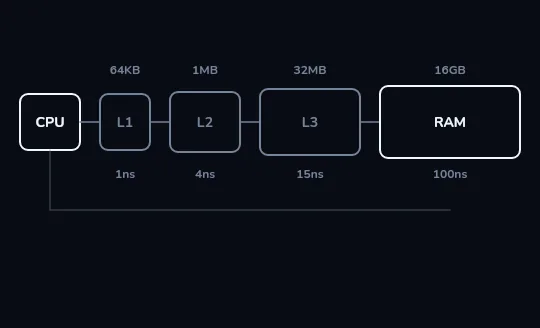
The hierarchy: L1, L2, L3, then RAM Next to the processor sit four boxes, each wider than the last: L1 at 64 KB and about 1 ns, L2 at 1 MB and about 4 ns, L3 at 32 MB and about 15 ns, and RAM at 16 GB and about 100 ns. Each level is bigger and slower than the one before. These sizes and times are rough examples, not exact figures for any one chip.
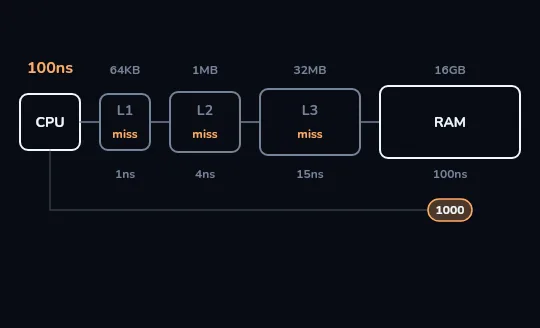
Address 1000: miss, miss, miss, RAM The processor asks for address 1000 for the first time. L1 doesn't have it, nor does L2, nor L3: each one flashes a miss, and the request goes all the way to RAM. The timer reads about 100 nanoseconds.
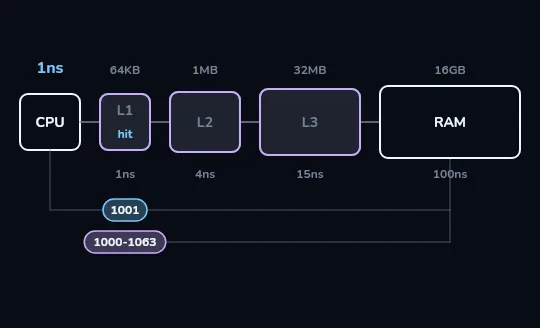
The line 1000-1063 comes back; 1001 is a hit RAM doesn't send back just one byte: the whole 64-byte line, addresses 1000 to 1063, travels back and is kept in the caches. So when the processor next asks for 1001, it's already in L1: a hit, in about a nanosecond.
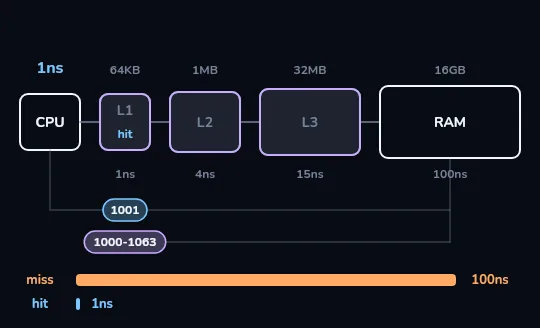
Miss 100 ns against hit 1 ns Two bars side by side: the miss, about 100 nanoseconds, stretches across the frame; the hit, about 1 nanosecond, is a thin sliver. It's the same kind of read, roughly a hundred times faster, only because the data was already close by.
Check yourself
Right after the read of address 1000 you just watched, the processor asks for address 1040. What happens?
- Another miss all the way to RAM, about 100 ns, because 1040 was never asked for
- A hit in L1, about 1 ns, because 1040 came in with the line 1000-1063
- A hit, but only in L3, because L1 holds just one byte
- An error, because only 1000 and 1001 were loaded
Show the answer
A hit in L1, about 1 ns, because 1040 came in with the line 1000-1063
Right. The miss on 1000 brought in the whole 64-byte line, 1000 to 1063, and 1040 is inside it. That's the free ride the cache line gives you.
If an L1 hit took one second
Stretch time so that an L1 hit takes one second. Then a RAM read would take about one and a half to two minutes. Reading from an SSD would take about a day, and a hard disk finding its spot would take a few months. These are rough, famous comparisons rather than exact numbers, but the shape is right: every step away from the processor costs a lot more waiting. That's why keeping the hot data close matters so much.
Same number of reads, very different speed
Walking an array in order
Read item 0, 1, 2, 3...
One miss brings in a 64-byte line, and the next several reads are hits. The processor mostly waits about a nanosecond at a time.
This is spatial locality: using data next to what you just used.
Jumping around memory
Follow a long chain of pointers scattered all over RAM.
Almost every read lands on a new line, so almost every read is a miss, about 100 ns each.
The same number of instructions can run many times slower.
Check yourself
Which list goes from fastest to slowest?
- L1 cache, register, RAM, SSD
- Register, L1 cache, RAM, SSD
- Register, RAM, L1 cache, SSD
- SSD, RAM, L1 cache, register
Show the answer
Register, L1 cache, RAM, SSD
Right. Registers sit inside the processor's core, L1 is right next to it, RAM is off the chip, and the SSD is slower still.
The whole memory hierarchy
- From top to bottom: registers → L1 → L2 → L3 → RAM → SSD → hard disk.
- Each step down is bigger, cheaper per byte and slower.
- Caches work because of locality: programs reuse the same data soon (temporal) and use data next to what they just used (spatial).
- You don't manage these caches yourself; the hardware fills and empties them automatically.
Check yourself
Match each place data can be to its rough read time
Show the answer
- L1 cache → About 1 nanosecond
- L3 cache → About 10-20 nanoseconds
- RAM → About 100 nanoseconds
- SSD → Tens of microseconds
Lesson recap
- A RAM read takes roughly 100 ns, about 300 ticks of a 3 GHz processor.
- A cache is a small, fast memory on the chip that keeps copies of recently used data, in levels L1, L2 and L3.
- A hit is served in about a nanosecond; a miss goes to the next level and eventually to RAM, and keeps a copy on the way back.
- The cache fetches whole 64-byte lines, so reading data in order is fast and jumping around memory is slow.
- The memory hierarchy runs registers, L1, L2, L3, RAM, SSD, hard disk: each step bigger, cheaper and slower.