
Fetch, decode, execute: the loop that runs everything
Step through the three-beat cycle a processor repeats for every instruction, see how the program counter keeps its place, and how a jump makes loops and decisions possible.
Program counter (PC)
A special register inside the processor that holds the address of the next instruction to run. After each normal instruction it moves on to the next one; in our toy processor, where every instruction is 4 bytes, that means adding 4.
PC = 8 means "the next instruction is the one stored at address 8". In our toy program that's ADD R3,R1,R2.
The cycle, forever
- Fetch
Read the instruction at the address in the PC from memory, and copy it into the instruction register (IR) inside the CPU.
- Decode
The control unit works out what those bytes mean: which operation, which registers, which address.
- Execute
The ALU or the memory does the work, and the result is written back, into a register or into memory.
- Move on and repeat
The PC moves to the next instruction and the loop starts again, billions of times a second. Even when the computer looks idle, the operating system is running instructions, or has told the CPU to sleep until something happens.
Check yourself
In what order does the processor handle each instruction?
- Execute, fetch, decode
- Decode, fetch, execute
- Fetch, decode, execute
- Fetch, execute, decode
Show the answer
Fetch, decode, execute
Right. First fetch the instruction from memory, then decode what it means, then execute it. Then the PC moves on and it starts again.
A finger on the recipe
Picture following a long recipe with your finger on the current line. You read the line (fetch), work out what it asks (decode), do it (execute), then slide your finger down one line. The program counter is that finger. Sometimes a line says "go back to step 3 and repeat until the dough is smooth", and your finger jumps back up instead of moving down. Where the analogy breaks: the processor never skims ahead or reads the whole recipe; it only ever sees the line under its finger.
Check yourself
What does the program counter hold?
- The number of instructions run so far
- The address of the next instruction to run
- The result of the last calculation
- The whole program, ready to run
Show the answer
The address of the next instruction to run
Right. Despite the name, it doesn't count how many instructions ran. It holds the address the next fetch will read from.
Step through it
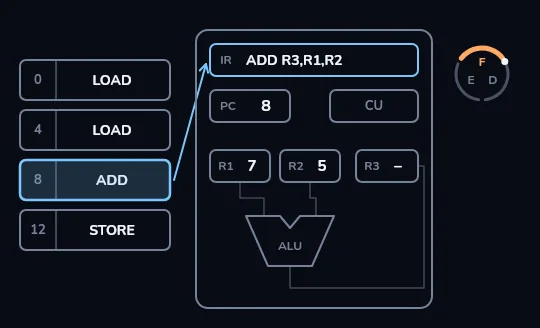
Fetch Memory holds LOAD, LOAD, ADD and STORE at addresses 0, 4, 8 and 12. The PC reads 8, so the ADD cell at address 8 lights up and its whole instruction, ADD R3,R1,R2, is copied along an arrow into the instruction register (IR). In the ring at the top right, F for fetch is lit.
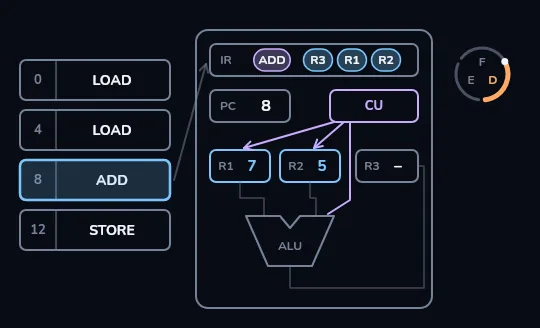
Decode The instruction in the IR splits into its parts: ADD, R3, R1, R2. Lines light from the control unit to R1, R2 and the ALU: it's an add, using R1 and R2, with the answer going to R3. In the ring, D for decode is lit.
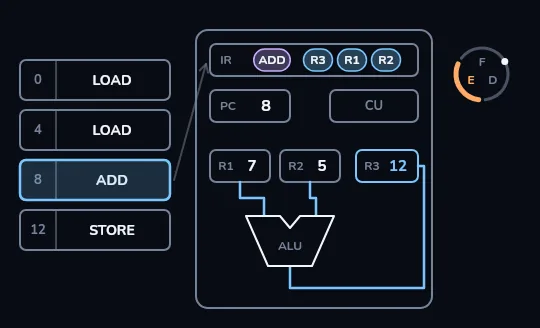
Execute The values 7 and 5 flow from R1 and R2 into the ALU, and 12 flows out into R3. In the ring, E for execute is lit. This one instruction is done.
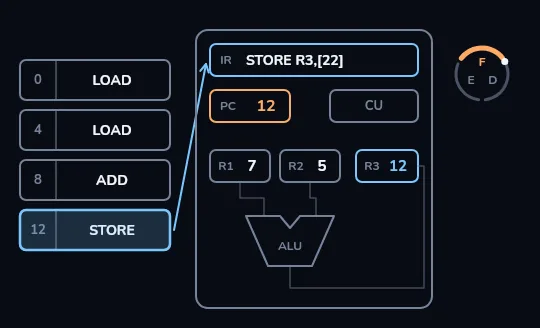
PC moves on, and round again The PC changes from 8 to 12, the next 4-byte instruction, and the highlight moves to the STORE cell. The ring spins back to F and STORE R3,[22] is fetched into the IR, while R3 still holds 12. The cycle keeps turning like this, billions of times a second.
Check yourself
In our toy processor every instruction is 4 bytes. It has just executed a normal (non-jump) instruction at address 12. What is the PC now?
- 13
- 16
- 12
- 4
Show the answer
16
Right. Each instruction takes 4 bytes, so the next one starts 4 addresses later: 12 + 4 = 16.
JUMPS
How a straight line becomes loops and decisions
A jump instruction sets the PC to a different address instead of the next one, so the processor carries on from somewhere else. A conditional jump, such as "jump if not zero", only jumps when a condition holds; otherwise the PC moves on as normal. Those two are enough to build every loop and every if/else in every program you've used.
"If the password is wrong, jump to the error message; otherwise carry on to the home screen" is one comparison and one conditional jump.
; R1 starts at 3
40: SUB R1, R1, 1   ; R1 = R1 - 1
44: JNZ R1, 40      ; if R1 is not 0, set PC = 40
48: ... ; carry onR1: 3 → 2 → 1 → 0
SUB ran 3 times; at 0 the jump is skipped and PC moves on to 48SUB and JNZ (jump if not zero) are two extra toy instructions. The loop is nothing more than the PC being sent back to 40 until the condition fails.
Check yourself
Which kind of instruction makes a loop possible?
- ADD
- LOAD
- A conditional jump
- STORE
Show the answer
A conditional jump
Right. A conditional jump sends the PC back to an earlier address while a condition holds, so the same instructions run again, and stops the loop when it no longer holds.
Check yourself
Before running a program, the processor reads the whole thing and works out what it is trying to do.
Show the answer
False
False. The processor never sees the program as a whole or "understands" it. It only ever looks at the one instruction the PC points to: fetch it, decode it, execute it, move on.
Lesson recap
- The program counter (PC) holds the address of the next instruction.
- Every instruction goes through fetch (read it into the IR), decode (work out what it means) and execute (do it).
- After a normal instruction the PC moves to the next one: with 4-byte instructions, 8 becomes 12.
- A jump sets the PC somewhere else; a conditional jump does it only when a condition holds, which makes loops and if/else possible.
- The processor only ever sees one instruction at a time; pipelining overlaps the stages so more finish each second.