
RAM: a row of numbered boxes
Picture memory as billions of numbered one-byte boxes, see how the processor writes and reads one by its address, and why everything in RAM vanishes when the power goes.
THE PICTURE
One long row of one-byte boxes
RAM (random-access memory) is a row of boxes. Each box holds exactly one byte, eight bits, so a number from 0 to 255. Each box also has a number of its own, its address, counting up from 0. The processor never asks for "the photo" or "the word hello"; it only ever asks for the byte at some address. Because every single byte has its own address, RAM is called byte-addressable.
A laptop with 8 GB of RAM has about 8.6 billion of these boxes (8 × 1,024 × 1,024 × 1,024), numbered from 0 up to roughly 8.6 billion.
Check yourself
When the processor asks RAM for "address 12", what exactly is it pointing at?
- The twelfth file on the disk
- One single byte-sized box in RAM, the one numbered 12
- A whole program that starts at number 12
- The twelfth register inside the processor
Show the answer
One single byte-sized box in RAM, the one numbered 12
Right. An address picks out exactly one box, and each box holds one byte. Files live on the disk and registers live inside the CPU; an address is about RAM.
Random access
Being able to reach any address in about the same time, whether it's box 5 or box 5 billion. A cassette tape is the opposite: to hear the last song you have to wind through everything before it. For RAM, one read takes roughly 100 nanoseconds (a nanosecond is a billionth of a second). That's instant for a person, but as the next lesson shows, it's a long wait for a processor.
Reading address 3 and then address 7,000,000,000 costs about the same: no winding, no searching, just "give me that box".
A wall of numbered post boxes
Think of a post office wall with billions of small numbered boxes, each big enough for one slip of paper with a number on it. The processor is the clerk: it can put a slip into box 12 (write), or look at what's in box 12 (read). It never searches the wall; it always walks straight to a number. Where the analogy breaks: a real post box can be empty, but a RAM box always holds some value, even if it's leftover junk from earlier.
Check yourself
Reading the very last address in a computer's RAM takes much longer than reading address 0, because the processor has to pass all the boxes in between.
Show the answer
False
False. That's what "random access" means: any address can be reached in about the same time, roughly 100 nanoseconds, whether it's the first box or the last. There's no winding through the ones in between.
Step through it
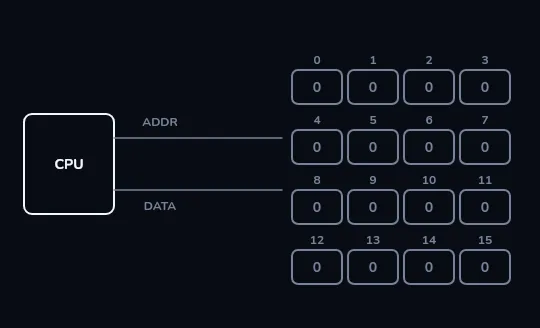
Sixteen numbered boxes, all holding 0 On the left is the processor, on the right a tiny memory of sixteen boxes numbered 0 to 15, each holding one byte, all 0 for now. Two lines join them: one carries an address, the other carries a value. Real RAM works the same way, just with billions of boxes.
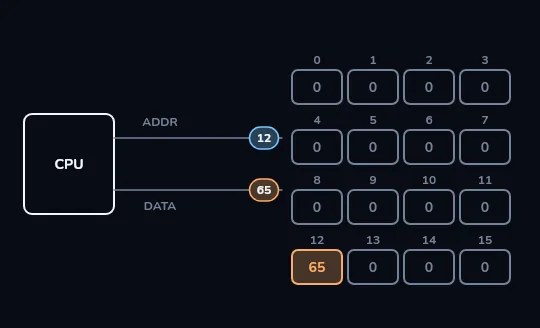
Write: address 12, value 65 To write, the processor sends two things at once: the address 12 on the address line and the value 65 on the data line. Box 12 now holds 65 and every other box is untouched. (65 is also the code for the letter A, from lesson 2.)
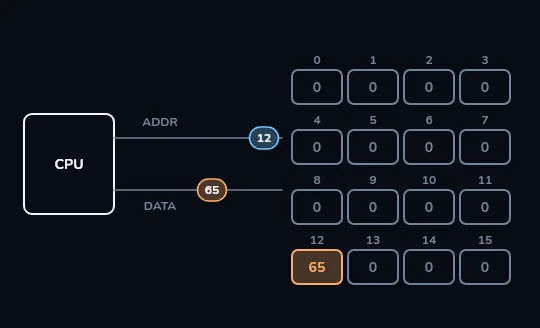
Read: address 12 gives back 65 Later, to read, the processor sends only the address, 12. The memory answers with whatever box 12 holds, and 65 travels back along the data line. Reading doesn't empty the box: 65 stays there until something writes over it.
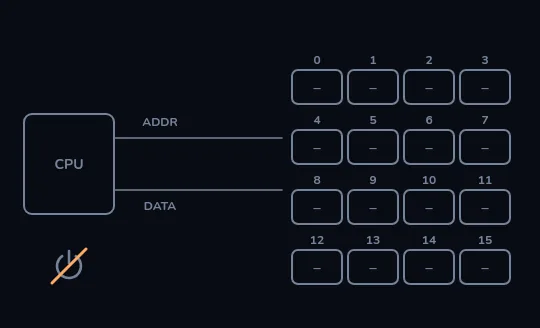
Power off: every box forgets Now the power is cut. Every box fades to empty, box 12 and its 65 included. RAM only holds values while it's switched on, which is why a document you hadn't saved is gone after a power cut.
Check yourself
In the frames you just stepped through, the processor wrote 65 at address 12, then read address 12. Nothing else happened in between. What did it get back?
- 0, because reading always starts from an empty box
- 12, the address itself
- 65, the value it wrote there
- Nothing, because a box is emptied after it's written
Show the answer
65, the value it wrote there
Right. A box keeps its value until something writes over it (or the power goes). Read address 12 and you get the 65 that was put there.
BIGGER THAN A BYTE
Big values take neighbouring boxes
One byte only goes up to 255, so anything bigger spreads across several boxes side by side. A 64-bit number takes 8 consecutive bytes; a word of text takes one or more bytes per letter. In a program, a variable is really a friendly name for an address. And when an address itself is stored as a value, so one part of a program can tell another where something is, that value is called a pointer.
A list of scores might start at address 5000. The program keeps the number 5000 somewhere as a pointer, meaning "the list starts there", and finds each score by counting on from it.
Check yourself
Maryam's laptop ran out of battery while she was typing a report she hadn't saved. The latest version was only in RAM, so it's gone.
Show the answer
True
True. RAM is volatile: with no power the values leak away. Only what had been saved to storage (the disk) survives. That's why autosave, which copies your work to the disk every so often, matters.
Memory and storage are not the same thing
RAM (memory)
Where running programs and open files live while you work.
Typical size: 8 or 16 GB.
Forgets everything when the power goes.
SSD (storage)
Where apps, photos and the system are kept when nothing is running.
Typical size: 256 GB to 1 TB or more.
Keeps everything with the power off.
Check yourself
- Reza's laptop has 8 GB of RAM. With his usual 40 browser tabs, a video call and a spreadsheet, it uses about 11 GB and slows to a crawl. He upgrades to 16 GB and it becomes smooth again.
- Leila's laptop has 16 GB of RAM, and her work never uses more than about 6 GB. She upgrades to 32 GB and notices no difference at all.
What explains why the same kind of upgrade helped Reza but not Leila?
- Leila's new RAM must be faulty
- More RAM only helps when you'd otherwise run out; Reza was over his limit, Leila was never near hers
- RAM upgrades only work on laptops with 8 GB
- Leila needed a faster disk, not more RAM, because RAM doesn't affect speed at all
Show the answer
More RAM only helps when you'd otherwise run out; Reza was over his limit, Leila was never near hers
Exactly. Reza needed 11 GB and had 8, so his computer kept pushing things out to the slow disk; the upgrade stopped that. Leila used 6 of her 16 GB, so the extra 16 just sits empty.
Lesson recap
- RAM is one long row of boxes, each holding one byte, each with a number: its address, starting at 0.
- The processor does just two things with it: write a value at an address, and read the value at an address.
- Random access means any address takes about the same time, roughly 100 nanoseconds.
- Bigger values use several neighbouring boxes; a variable names an address, and a pointer is an address stored as a value.
- RAM is volatile: without power it forgets everything, so unsaved work is lost in a power cut.
- More RAM helps only when you'd otherwise run out, and storage size is not memory size.