
What happens when you open a website
Follow the whole trip from typing a web address to seeing the page on screen, and meet the five words — server, IP address, DNS, request, packet — the rest of this course builds on.
THE OTHER SIDE
Someone has to answer
example.com isn't just a name floating in space. It's a computer sitting somewhere, always on, waiting for people to ask it for pages. That computer is called a server. Your phone is the one asking; it's usually called a client.
It's the same shape every time: a client sends a request ('give me the page'), a server sends back a response (the page itself).
Check yourself
You type example.com and the page loads. In this trip, what is your phone, and what is the computer that holds the page?
- Your phone is the server; the page's computer is the client
- Your phone is the client; the page's computer is the server
- Both are servers, since both send data
- Neither; only routers have those names
Show the answer
Your phone is the client; the page's computer is the server
Right. Your phone asks, so it's the client. The computer holding the page answers, so it's the server.
A name means nothing to a computer
You save a friend's number under their name and let your phone remember the digits. The internet works the same way: example.com is a name for humans, but computers route everything by number, an IP address. Somewhere has to hold the list that turns one into the other; that's the job of DNS. Where the analogy breaks: your contacts list only has your own friends; DNS holds addresses for the whole internet, and almost anyone can ask it.
Check yourself
Computers don't use example.com to find the server at all; they use a numeric IP address, and DNS is what turns the name into that number.
Show the answer
True
True. example.com is for people to type and remember. Computers need a number, an IP address, to actually connect — and DNS is the lookup that supplies it.
Step through it
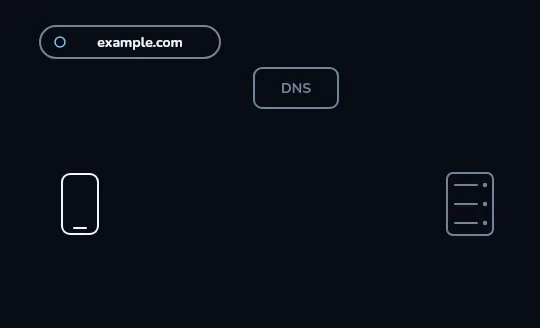
Before anything happens You've just typed example.com into the address bar. Nothing has moved: the phone only knows a name, not a place. DNS and the server are drawn faint because neither has been contacted yet.
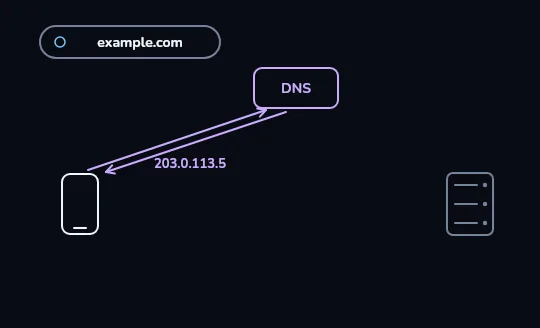
The name becomes an address Your phone asks DNS about example.com, and the lilac arrows show the question going up and the answer coming back: 203.0.113.5. That's the numeric address the rest of this trip will actually use.
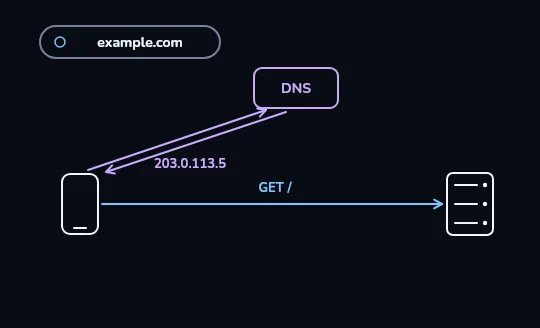
Your phone connects and asks for the page With the address in hand, the blue arrow goes straight from your phone to the server at that address, skipping DNS entirely. The label GET / is the request itself: give me the page.
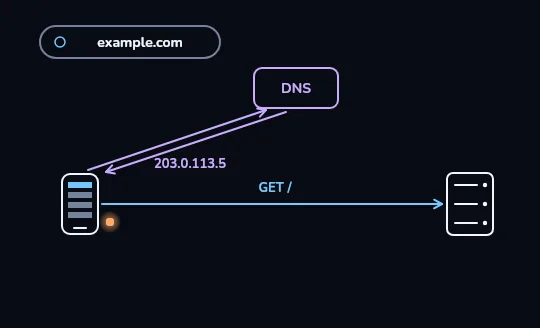
The page arrives in pieces and gets drawn The orange dots are small pieces of the page travelling one after another from the server to your phone. As they land, your phone's screen fills in line by line instead of waiting for the whole page to show up at once.
Check yourself
Looking at the frames: which two computers does DNS actually exchange messages with?
- Phone and server, directly, with DNS only watching
- Only the server and DNS — your phone waits outside that step
- Only the phone and DNS itself — the server isn't part of that exchange
- All three at once, in a single round trip
Show the answer
Only the phone and DNS itself — the server isn't part of that exchange
Right. In frame 1, the arrows connect only the phone and DNS: the phone asks, DNS answers with 203.0.113.5. The server isn't part of that exchange.
IN PIECES
The page doesn't arrive as one lump
Once your phone knows the address and has asked for the page, the server doesn't send the whole page in a single piece. It's broken into small chunks called packets, each sent separately and put back together by your phone as they arrive. That's why a page can visibly fill in, top to bottom, instead of appearing all at once.
You'll spend a whole lesson on packets soon; for now, just know that 'the page arrives' really means 'a lot of small packets arrive, in order.'
Check yourself
Sort each word to what it actually is
- example.com's server
- Your phone (the client)
- 203.0.113.5
- DNS, the lookup service
- GET /, the request for the page
Show the answer
A computer: example.com's server, Your phone (the client)
Not a computer (a number, a lookup, or a message): 203.0.113.5, DNS, the lookup service, GET /, the request for the page
Check yourself
- Typing example.com into the address bar loads the page.
- Typing 203.0.113.5 into the address bar also loads the same page.
Both work and load the same page. What does that tell you about what a browser actually needs to connect?
- It needs the name; the number is just a backup
- It needs the numeric IP address; the name is only a convenience DNS translates into it
- It needs both at once, or it refuses to connect
- It needs neither; the browser guesses the server from your location
Show the answer
It needs the numeric IP address; the name is only a convenience DNS translates into it
Exactly. The browser's real target is always the IP address. Typing the name just adds a DNS step first; typing the number skips that step because you supplied it yourself.
Lesson recap
- Your phone (the client) asks; example.com's computer (the server) answers with the page.
- DNS turns the name example.com into a numeric IP address, 203.0.113.5, that computers can actually connect to.
- Once your phone has that address, it connects to the server and sends a request: GET /.
- The page comes back in small packets, not one lump, which is why it can fill in as it arrives.