
TCP: making sure everything arrives
Packets can be lost, duplicated or arrive out of order, so TCP adds a conversation on top: a handshake to open the line, a number on every piece, and a resend whenever an acknowledgement doesn't show up. See where that's worth the wait, and where a call or a game skips it on purpose.
THE PROBLEM
Packets don't promise to arrive, in order, or even once
On their own, packets make no guarantees. A busy router can drop one, a retry can send a copy that duplicates another, and packets sent one after another can arrive in a different order than they left in. For a short, disposable message that's often fine. For a file, a page, or a payment, one missing or reshuffled piece is a real problem.
It's like mailing a book one page at a time, in separate envelopes, through several sorting offices. Some pages could get lost, some could arrive twice, and they won't necessarily show up in page order.
Check yourself
Negar downloads a file, and halfway through, one packet carrying part of it never arrives. Why is this something the network has to actively deal with, rather than something that simply doesn't happen?
- Because every packet is guaranteed to arrive exactly once, so a missing one can only be a rare bug in her connection
- Because packets can be lost, duplicated or reordered, and nothing on the way stops that by itself
- Because her phone sent that packet to the wrong address by mistake
- Because the file was too large to be split into packets properly
Show the answer
Because packets can be lost, duplicated or reordered, and nothing on the way stops that by itself
Right. Nothing about a packet's journey guarantees it arrives, arrives once, or arrives in order. Anything that needs a message intact has to check for that itself.
THE FIX
TCP turns packets into a conversation
TCP sits on top of plain packets and adds the back-and-forth needed to make delivery reliable. Before any real data moves, the two sides open the connection with a short handshake: SYN, then SYN-ACK, then ACK, three messages that confirm both ends are ready and listening.
Only once that handshake is done does TCP start numbering the pieces it sends and expecting a reply for each one, which is what makes the rest of the conversation possible.
Check yourself
The TCP handshake needs exactly three messages, one to ask, one to agree and ask back, and one to confirm, before either side sends any real data.
Show the answer
True
True. SYN opens the question, SYN-ACK answers it and asks the same thing back, and ACK closes the loop. Only after those three messages does either side start sending real data.
Step through it
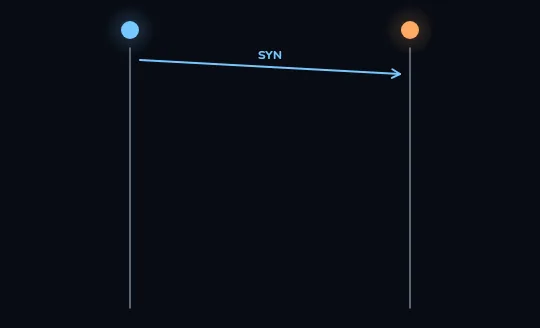
The client asks to open a connection: SYN Your phone, the client on the left, sends a single message toward the server on the right: SYN, short for synchronize. Nothing else has happened yet, no data at all, just this one opening question: can we talk?
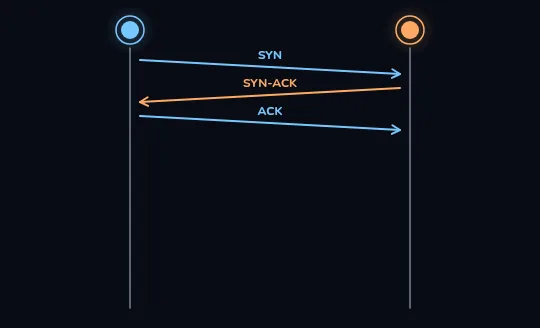
Three messages, and both sides are connected The server answers with SYN-ACK, agreeing and asking the same question back, and the client replies with ACK. That's three messages in total, the handshake, and now a ring appears around each end: the connection is open and both sides know it.
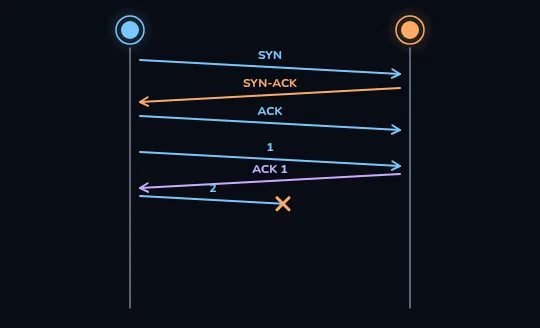
One piece confirmed, the next one lost Real data can finally move: piece 1 goes across and the server confirms it with ACK 1. Piece 2 is sent right after, but it never arrives; the orange X on the line shows it lost on the way, and no acknowledgement for it is coming.
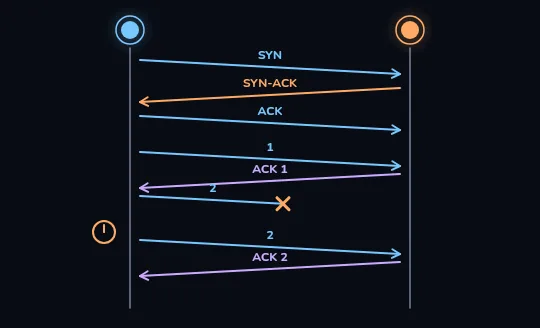
No acknowledgement in time, so it's sent again The client keeps a small timer running for every piece it sends, and this one runs out with no ACK 2 in sight, shown by the clock beside the client. So piece 2 is sent again, and this time ACK 2 comes back. Nothing that mattered is lost for good, it just costs one extra round trip.
Check yourself
In the frames you just watched, what happened to piece 2 after it went missing?
- The connection closed and had to be reopened with a new handshake
- The client waited until the server noticed and asked for it again
- The client's own timer ran out with no ACK 2, so it sent piece 2 again itself
- Piece 2 was skipped for good, and only piece 3 ever arrived
Show the answer
The client's own timer ran out with no ACK 2, so it sent piece 2 again itself
Right. The client is the one keeping time. When ACK 2 doesn't show up before its timer runs out, it resends piece 2 on its own, no new handshake needed.
HOW IT ADDS UP
Numbered pieces, one acknowledgement each
Every piece TCP sends carries a number, so the other side can put pieces back in order even if they arrive out of sequence, and can tell at a glance which numbers it's still missing. Each arrived piece gets its own acknowledgement; anything unacknowledged after a wait is treated as lost and sent again, exactly what you just watched happen to piece 2.
That's why a slightly delayed piece rarely breaks anything on its own: TCP just holds what already arrived, waits, and slots the resend in once it shows up.
Check yourself
Match each term to what it means
Show the answer
- SYN → The first message, asking to open a connection
- SYN-ACK → The server's reply, agreeing and asking back
- ACK → Confirms a piece, or the handshake, arrived
- Retransmission → Sending a piece again after no ACK came in time
NOT ALWAYS THE RIGHT TOOL
Where TCP is worth the wait, and where it isn't
A downloaded file or a loaded page has to be complete; a single missing piece can genuinely break it, so waiting for a resend is worth the cost. A live video call or an online game is different: a lost fraction of a second is barely noticed, but pausing to wait for it to be resent would show up as a stutter, which is worse. For that kind of traffic, an alternative called UDP is often used instead, one that skips acknowledgements and resends and just keeps moving.
The trade-off in one line: TCP chooses to be complete even if that's slower; UDP chooses to keep moving even if it's occasionally missing a piece.
Check yourself
- You download a software update. One packet near the end gets lost; the app pauses for a moment, resends it, and the file is exactly right when it finishes.
- You're on a video call and one packet with a fraction of a second of audio gets lost; the call briefly glitches and moves on, without ever resending that packet.
What best explains why these two cases are handled so differently?
- The video call's lost packet happened to be smaller
- The download uses TCP, which waits and resends for a complete result, while the call favours staying live over being complete
- The call's provider simply has worse internet than the download's
- Software updates aren't allowed to travel as packets at all
Show the answer
The download uses TCP, which waits and resends for a complete result, while the call favours staying live over being complete
Exactly. A file has to be complete, so TCP's wait-and-resend is worth it there. A live call is worth more moving forward smoothly than pausing for one missing instant, so it typically skips that safety net.
Lesson recap
- Packets alone can be lost, duplicated or arrive out of order; nothing guarantees otherwise.
- TCP opens every connection with a three-message handshake: SYN, SYN-ACK, ACK.
- Every piece TCP sends is numbered and acknowledged; an unacknowledged piece is sent again.
- A file or a page needs everything, so TCP's wait-and-resend is worth it there.
- A live call or game often trades completeness for speed instead, using UDP.