
HTTP: asking for a page and getting an answer
See the exact text message your phone sends when it asks for a page, and read a server's answer well enough to know whether a broken page is on you or on it.
THE ASK
A request is a small text message
Every time your browser wants something, it sends a request: plain text, nothing hidden. A method says what kind of ask this is — GET to fetch something that already exists, POST to send data, like a filled-in form. A path says exactly which thing, like /menu. A couple of headers add detail: Host says which site on that server you mean, Accept says what format you can read.
GET /menu, Host: example.com, Accept: text/html means, in plain words: "give me the menu page from example.com, and I can read HTML."
Check yourself
Reza opens example.com/menu to see today's specials, then fills in a form to order lunch and hits submit. In order, which two methods does his phone use?
- GET, then GET
- GET, then POST
- POST, then GET
- POST, then POST
Show the answer
GET, then POST
Right. Viewing the menu is fetching something that already exists — GET. Submitting the order sends new data to the server — POST.
THE REPLY
The answer has a shape too
The server's answer is text too, with the same three kinds of part flipped around. A status code says how it went, like 200 for "here it is." Headers add detail — Content-Type says what kind of thing follows, like text/html or image/png. Then the body: the actual page, image or data your request asked for.
200 OK, Content-Type: text/html, then the page's own HTML. Your browser reads the first two parts to know how to handle the third.
Check yourself
Marzieh's phone sends the header "Accept: text/html" to tell the server what format she can read; the server's reply then carries "Content-Type: text/html" to say what format it's actually sending.
Show the answer
True
True. Accept lives in the request and states what the phone can handle. Content-Type lives in the response and states what the server is actually sending. One is an ask, the other is a fact.
READING THE ANSWER
What the codes mean, and who's to blame
Four codes cover almost everything you'll see. 200 means it worked, plain and simple, nobody's fault because nothing went wrong. 301 means the page moved somewhere else, and the server tells your browser exactly where; that's the site tidying itself up, not a problem. 404 means nothing lives at that address, which can be your side (a typo, an old bookmark) or the site's side (they deleted the page and forgot to redirect it). 500 means the server broke while trying to answer — that one is always on the server, never on you.
See 500 and refreshing rarely helps: the site's own code or database failed. See 404 and check your address first; if it's right, the page is just gone.
Check yourself
Sort each moment by whose "fault" it really is
- The page loads fine, 200
- You follow the site's own redirect to its new address, 301
- You mistype the address and get 404
- An old link you saved years ago has a typo you never noticed, 404
- You click a real link, but the site deleted that page without a redirect, 404
- The site's server crashes while building the page, 500
Show the answer
Nothing's wrong: The page loads fine, 200, You follow the site's own redirect to its new address, 301
Something on your side: You mistype the address and get 404, An old link you saved years ago has a typo you never noticed, 404
Something on the site's side: You click a real link, but the site deleted that page without a redirect, 404, The site's server crashes while building the page, 500
Step through it
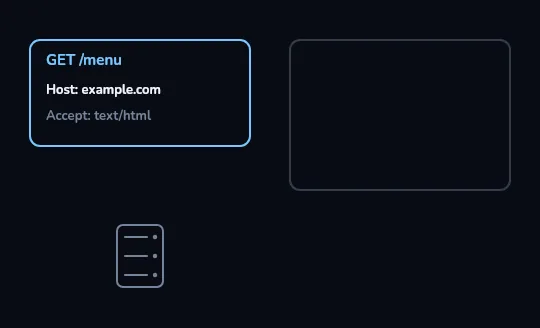
The request card, filled in and ready The request card on the left is filled in and ready: the method and path, GET /menu, then the Host and Accept headers under it. The response card on the right is still empty and faint, because nothing has been sent yet. The server, drawn small below, hasn't heard from anyone.
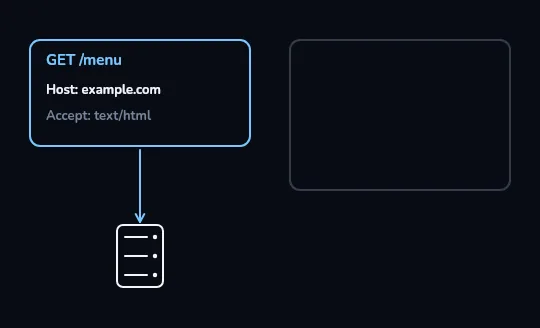
The request travels down to the server A blue arrow carries the request straight down to the server: the phone is sending exactly what's written in the card above, no more and no less. The response card on the right is still waiting, empty.
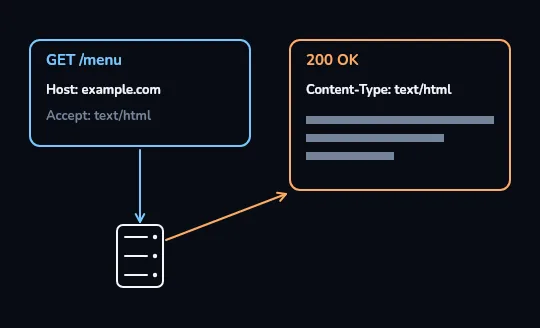
The server answers: 200 OK The server answers back: an orange arrow carries its reply up to the response card, which fills in — 200 OK, then Content-Type: text/html, then three grey bars standing in for the page's own content, the body.
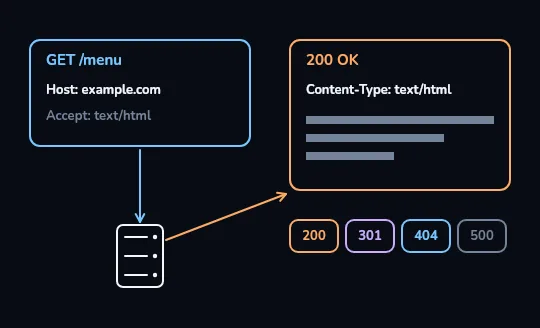
Four kinds of answer a server can give Under the response, four chips show the other kinds of answer this same server could have sent instead: 200 for fine, 301 for moved, 404 for not found, 500 for the server's own error. This time it happened to answer 200.
Check yourself
Kian requests a page, but the response card comes back reading "500" instead of "200 OK". Based on what the four chips mean, what most likely happened?
- The page moved to a new address
- The address doesn't exist on this server
- The server broke while it was trying to answer
- Everything worked exactly as expected
Show the answer
The server broke while it was trying to answer
Right. 500 means the server itself hit a problem while building the answer — its own code or database failing, nothing to do with what Kian asked for.
BEHIND THE SCENES
A page is never just one request
The HTML that comes back in the first response is really just a shopping list. Your browser reads it and immediately sends out more requests — one for every image, every font, every script and stylesheet the page needs. A simple-looking page is easily dozens of separate GET requests, each with its own response, all finishing before you'd call the page loaded.
Open your browser's network tab on almost any news site and you'll see fifty, eighty, sometimes hundreds of requests for one page — most of them images and scripts you never think about.
Check yourself
Match each status code to what it really means
Show the answer
- 200 → It worked — nobody's fault, nothing went wrong
- 301 → The page moved, and the server says exactly where
- 404 → Nothing lives at that address — could be your typo or the site's missing redirect
- 500 → The server broke while answering — always on the server
Lesson recap
- An HTTP request is plain text: a method (GET or POST), a path, and headers like Host and Accept.
- A response answers back with a status code, headers like Content-Type, and a body.
- 200 is fine, 301 is moved, 404 is not found (either side's fault), 500 is always the server's own error.
- A single page is normally dozens of requests — one for the HTML, then one for every image, font and script it needs.