
Wi-Fi, cables and the sea floor
See the real, physical path your data takes: a few metres of radio, then cable and fibre the rest of the way, some of it laid across the sea floor. You'll be able to explain why "the cloud" is just a building, and what happens when a cable gets cut.
THE LAST HOP
The wireless part is at the start
Wi-Fi from your router, or a signal from the nearest mobile mast, is the only wireless hop in most journeys, and it covers a short distance near you. After that single hop, nothing on the way to a server is wireless: it's radio close to home, then wires and fibre the rest of the way.
Video-calling a friend on another continent? Your phone reaches the router over Wi-Fi in a few metres. Nearly all the rest of the journey, thousands of kilometres, is cable.
THE REST OF THE JOURNEY
From your router to the world
From the home router, a cable, often fibre, sometimes copper, runs to your internet provider. From there, more cables run between cities, between countries, and eventually down to the coast, where undersea cables carry the signal across oceans to the next continent.
A phone opening a site hosted on another continent: router → local provider → cable to a landing point → undersea cable → a landing point on the far shore → the provider there → the data centre.
Check yourself
Nika video-calls a cousin who lives on another continent. Which best describes how most of that call's data travels?
- As radio waves the whole way, bounced from mast to mast
- Up to a satellite and straight back down to her cousin's phone
- Wi-Fi to her router, then almost entirely by cable and undersea fibre
- Wi-Fi connects her phone directly to her cousin's phone with no cable involved
Show the answer
Wi-Fi to her router, then almost entirely by cable and undersea fibre
Right. Only the hop to her router is wireless; from there it's cable and fibre, including cable across the sea floor, the rest of the way.
THE FAR END
"The cloud" is a building somewhere
The far end of every one of these trips is a data centre: a building full of racks of servers, cooling, and its own power supply. "The cloud" is just a friendly word for someone else's data centre, usually in a specific country, with a real address and a fence around it.
When you back up your photos "to the cloud", they land on a hard drive inside a real building. If that building loses power, the cloud is briefly not there.
Check yourself
"The cloud" is a good name because your files are stored spread out in the sky, not in one physical place.
Show the answer
False
False. Your files sit on physical hard drives inside a real data centre, a building in a real location. "Cloud" only describes that you don't manage that building yourself; it isn't stored in the sky or nowhere in particular.
Step through it
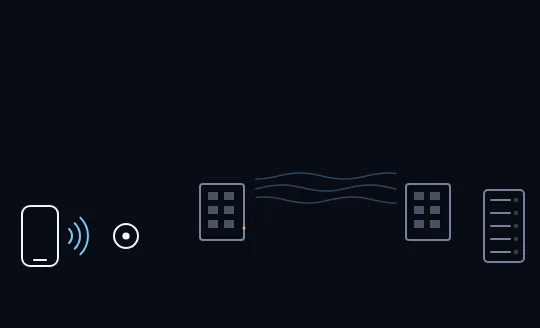
Only the first hop is wireless Your phone reaches the router over Wi-Fi, the wavy radio lines on the left. That's the only wireless hop in the whole picture. Further along, still faint, sit the ISP's building, the sea, a landing point on the far shore, and a rack of servers: the rest of the journey, not yet lit.
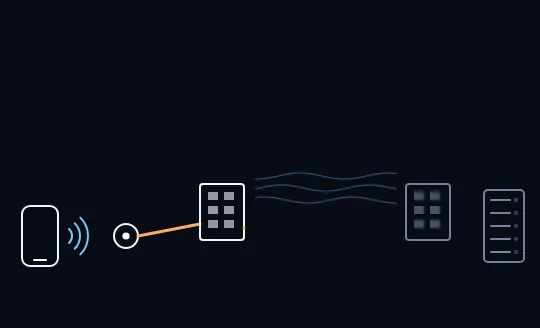
The router's cable to the ISP An orange cable lights up from the router to the ISP's building. This is ordinary wired or fibre cable, the same kind that runs under streets and into buildings. From here on, the signal travels on wires for the rest of the trip.
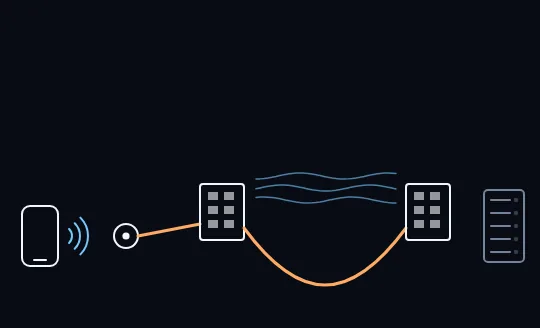
Under the sea to the far shore The lit cable now dips under the wavy sea and comes back up at a landing building on the far shore. This is an undersea cable, one of hundreds laid across ocean floors around the world, carrying the signal between continents.
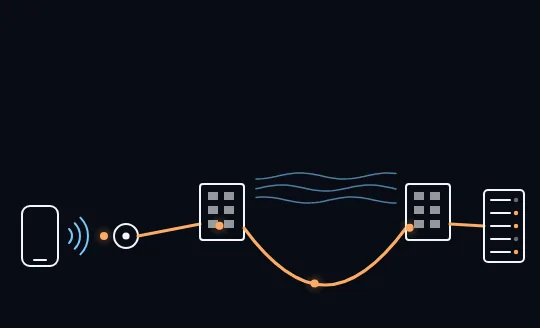
The whole path, end to end The cable reaches a rack of servers, the data centre, and its lights blink to life. Orange pulses now loop along the entire path, from your phone's Wi-Fi through the router and the ISP, under the sea, to this building. That building is what people mean by "the cloud".
Check yourself
Match each part of the path to what it is
Show the answer
- Phone to router → The only wireless hop
- Router to the ISP → A wired or fibre cable
- Under the ocean → An undersea cable
- The rack of servers at the far end → A data centre — "the cloud"
WHEN IT BREAKS
What a cut cable does
Undersea cables do get damaged, usually by a ship's anchor or a fishing trawler, sometimes by an earthquake. Because there are usually several cables on a route, traffic often reroutes onto the others automatically, and you may only notice things feel a bit slower. When too many cables on one route are cut at once, a whole region can lose part of its connection until a repair ship, which can take weeks, fixes it.
A country connected by only one or two undersea cables is far more exposed than one with several; that's one reason some places invest in extra cables and extra routes.
Check yourself
- A single undersea cable on a busy route is cut by a ship's anchor.
- Every undersea cable connecting a country to the rest of the world is cut within the same week.
What differs between how badly each event affects ordinary internet use?
- Case A barely shows, because traffic reroutes onto other cables; case B can cut off most of the country's connection
- Both cause the exact same nationwide outage, since any cut is treated the same way
- Case A is worse, because a single cable carries more traffic than several combined
- Neither has any effect, because satellites take over automatically
Show the answer
Case A barely shows, because traffic reroutes onto other cables; case B can cut off most of the country's connection
Right. Redundancy is the difference: with several cables on a route, losing one is barely felt. Losing all of them at once removes the redundancy itself.
Lesson recap
- The only wireless hop in most journeys is at the start: Wi-Fi or a mobile mast.
- After that, it's cable and fibre all the way: your provider, between cities, and under the ocean floor.
- The great majority of intercontinental traffic goes by undersea cable, not satellite.
- "The cloud" is a real building, a data centre full of servers, somewhere specific.
- A cut cable is usually rerouted around; losing every cable on a route is what causes a real outage.