
Caches and CDNs: why the second visit is fast
See why a page loads slow the first time and fast right after, what your browser's cache and a CDN each keep close to you, and why a hard refresh is sometimes the fix for a stuck old page.
WHY DISTANCE MATTERS
Distance costs time, so copies are kept closer
A request and its answer both have to physically travel, and nothing moves faster than light; even at that speed, a round trip to a server on another continent adds real, noticeable time. So instead of every single request making that trip, systems keep copies of files at points closer to you, and hand those out instead whenever they can.
A photo on a popular site isn't fetched from one far-away computer every time a million people look at it. A copy sits much closer to most of them.
Check yourself
Niloofar opens a page for the very first time today, and it takes noticeably longer to load than it does the second time she opens it a minute later. What's the most likely reason?
- The first visit went all the way to a far server; the second was answered by a closer copy
- Her phone got faster in that one minute
- The page is simply smaller the second time
- Her internet provider gives her a speed boost after the first visit, so everything after it loads faster
Show the answer
The first visit went all the way to a far server; the second was answered by a closer copy
Right. The first visit usually has nothing nearby to answer from, so it makes the long trip. Once a copy exists closer to her, the second visit doesn't have to repeat that trip.
Two different kinds of "closer"
Browser cache
Lives on your own device. Only you use it. It holds copies of files from sites you personally visited, kept for a while after.
CDN node
Lives near your city, run by the site or a delivery network. Shared by everyone nearby. Holds copies the site pushed out in advance, before you ever visited.
Check yourself
A CDN node near your city only starts holding a copy of a file after you personally request it; it can't have anything ready before your very first visit.
Show the answer
False
False. Sites often push copies out to CDN nodes ahead of time, or a node caches a copy the first time anyone nearby asks for it, not only you specifically. Either way, plenty of what a CDN serves you was never fetched because of your own request.
Step through it
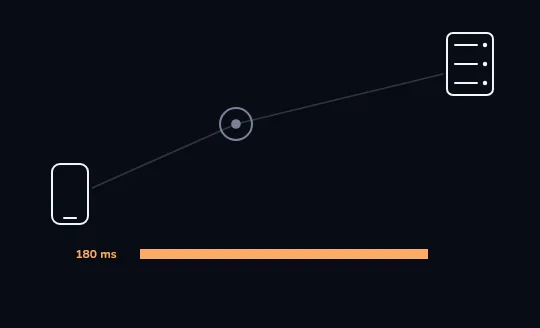
The first request goes all the way to the origin The first request travels the whole grey path: from the phone, past a nearby node that has nothing yet, all the way to the origin server far away. The orange bar below, 180 ms, is how long that full trip took.
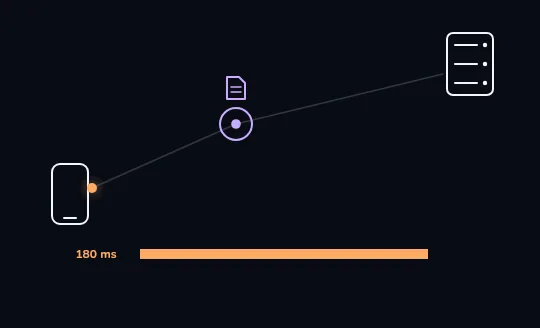
On the way back, the nearby node keeps a copy As the answer travels back along the same path, shown as an orange dot, the nearby node turns lilac and a small file icon appears above it: it just kept its own copy of what came back, so it won't have to ask the origin again next time.
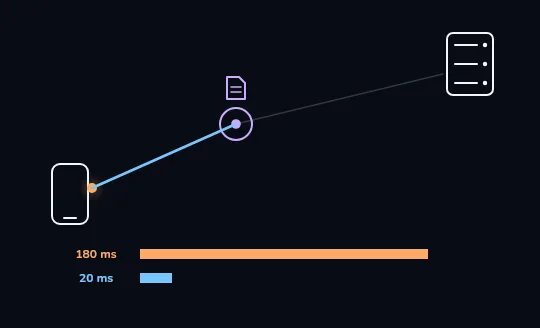
The second request stops at the node A second request, in blue, only travels as far as the nearby node; it never needs to reach the distant origin at all, because the node already has a copy. The new bar below, 20 ms, is far shorter than the first trip's 180 ms.
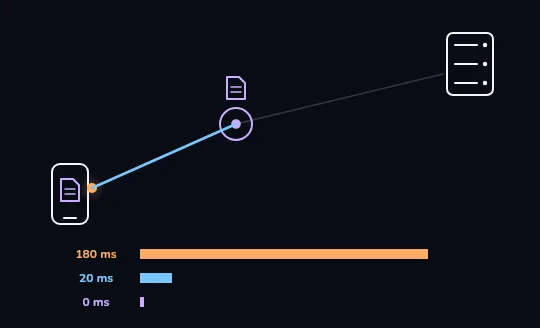
The third time, the phone answers itself By the third visit, a file icon sits inside the phone itself: the browser's own cache already has a copy, so nothing has to travel anywhere at all. The third bar is a thin lilac sliver, close to 0 ms.
Check yourself
Looking at the three bars you just watched, 180 ms, then 20 ms, then close to 0 ms, what does each drop actually represent?
- The internet itself getting faster over those few minutes, so every trip along it took less time
- The request travelling a shorter distance each time, until it didn't travel at all
- The page getting smaller each time it's requested
- The phone's own processor speeding up
Show the answer
The request travelling a shorter distance each time, until it didn't travel at all
Right. Each shorter bar is the same request needing to travel less distance: first all the way to the origin, then only to a nearby node, then nowhere at all once the phone has its own copy.
WHEN THE COPY IS WRONG
Why a hard refresh fixes a stuck old page
A cache's whole point is to hand you the old copy instead of asking again, which is fast, but occasionally wrong: the site changed and your cache doesn't know yet. A normal refresh often reuses the same cached files. A hard refresh tells the browser to skip its cache and ask the real origin again, and clearing the cache empties it out completely, so the next request has to fetch fresh copies of everything.
You see an old price on a page you know just changed. A hard refresh, often Ctrl/Cmd+Shift+R, forces a fresh fetch and the new price shows up.
Check yourself
Sort each fix by what it actually does
- Reuses whatever is already cached, so a stale copy can stay stale
- Skips the cache and asks the real origin again
- Usually the fastest option when nothing has actually changed
- The right move when you know the page changed but still see the old version
- Empties old files out completely so the next visit fetches everything fresh
- Good enough for a page you're opening for the very first time today
Show the answer
A normal refresh: Reuses whatever is already cached, so a stale copy can stay stale, Usually the fastest option when nothing has actually changed, Good enough for a page you're opening for the very first time today
A hard refresh or clearing the cache: Skips the cache and asks the real origin again, The right move when you know the page changed but still see the old version, Empties old files out completely so the next visit fetches everything fresh
THE BIG PAYOFF
Why a video works fine although its servers are far away
A video site doesn't stream everyone's video from one distant building. Its popular videos get copied out to CDN nodes in cities all over the world, ahead of time or after the first few people ask. You almost never talk to the site's original, distant servers at all; you talk to a node that might be a short hop from your own city, holding the exact video you wanted.
Someone in Tehran watching a video whose company is headquartered on another continent is very likely streaming from a node much closer to home, not from that faraway building.
Check yourself
- Yalda streams a very popular new video the same minute it's released; it buffers and stutters for the first few seconds.
- An hour later, Yalda's neighbor streams the same video and it plays instantly, no buffering at all.
What's the most likely reason the neighbor's experience is smoother?
- Yalda's phone is simply worse than her neighbor's
- By the time the neighbor watches, a nearby CDN node likely already holds a copy of that video, where Yalda's request may have been among the first still reaching further
- The video company slows down new videos on purpose
- Videos always play worse the same day they're released, no matter what
Show the answer
By the time the neighbor watches, a nearby CDN node likely already holds a copy of that video, where Yalda's request may have been among the first still reaching further
Exactly. Right after release, a nearby node may not have a copy yet, so some early requests reach further, closer to the origin. An hour later, that node has very likely already cached a copy from the wave of people who watched in between.
Lesson recap
- Distance costs time, so systems keep copies closer to you instead of fetching from far away every time.
- Your browser's own cache lives on your device; a CDN node lives near your city and serves everyone around you.
- The first visit often goes all the way to the origin; later visits are answered by a closer copy, and get faster each step.
- A hard refresh or clearing the cache skips old copies and forces a fresh fetch, which is the fix for a stuck, stale page.