
Addresses: how a device is found
See why the address your phone shows at home (192.168.1.x) isn't what the internet actually sees, meet the router's public address (203.0.113.5), and learn how NAT gets a reply back to the right device.
EVERY DEVICE
An address for every device
Every device that connects to a network gets an IP address: a number that says exactly where to send data. Your phone, your laptop, even your smart TV each get their own. Inside your home, your router is the one handing these out.
A phone might get 192.168.1.2, a laptop 192.168.1.3, a TV 192.168.1.4 — all handed out by the same router, 192.168.1.1.
Check yourself
Inside your home network, who hands out addresses like 192.168.1.2 and 192.168.1.3 to your phone and laptop?
- Each device picks its own address randomly
- DNS assigns them the moment you buy the device
- Your router hands them out
- example.com's server assigns them when you visit it
Show the answer
Your router hands them out
Right. Your router is in charge of your home network, and it's the one assigning each device its own address.
Two addresses, two jobs
Private address (192.168.1.x)
Only means something inside your home. Your phone and your neighbor's phone can both be 192.168.1.2 at the same time — they're on different networks, so it never clashes.
Public address (203.0.113.5)
The one address your router shows to the whole internet. Every device at home shares it when talking to the outside world.
Check yourself
Because private addresses like 192.168.1.2 aren't unique across the whole internet, two different homes can both have a device at exactly that address without any conflict.
Show the answer
True
True. A private address only has to be unique inside its own home network. Since it never leaves that network on its own, thousands of homes can reuse 192.168.1.2 with no clash at all.
Step through it
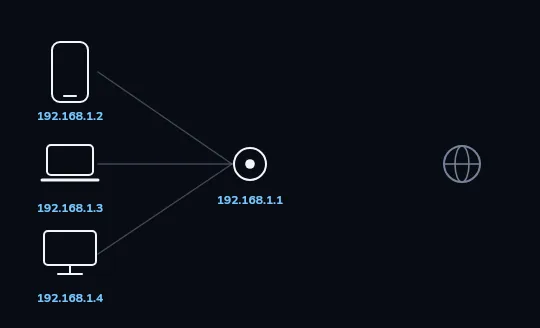
One home, three devices, no internet yet Three devices, a phone, a laptop and a TV, are each wired to the same router with their own private address. The globe on the right is the internet, but it's faint: nothing has connected to it yet.
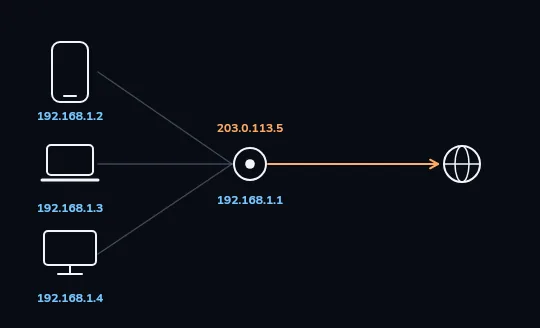
One public address for the whole house An orange arrow now runs from the router out to the internet, labelled 203.0.113.5. That's the router's own public address, the only one the internet ever sees for this entire home, no matter which of the three devices is asking.
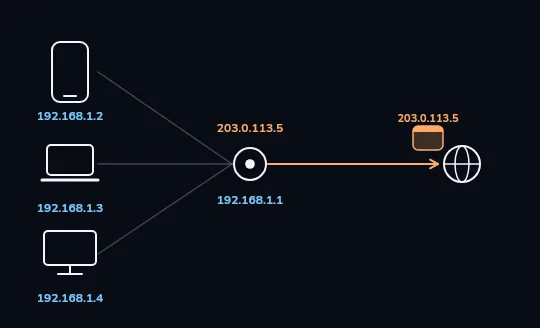
The router swaps the address on the way out The phone sends a packet labelled with its own private address, 192.168.1.2 (blue). Passing through the router, it leaves for the internet relabelled with the router's public address, 203.0.113.5 (orange). That swap is called NAT.
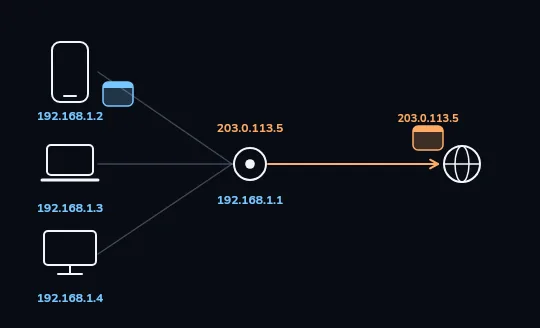
The router remembers who asked A reply comes back from the internet addressed to 203.0.113.5, the shared public address. The router turns it back to blue and hands it to 192.168.1.2 specifically, because it kept track of which device sent the original request.
Check yourself
Stages 2 and 3 of the diagram show a packet leaving as 192.168.1.2 and a reply coming back addressed to 203.0.113.5. How does that reply end up back at the right phone and not the laptop or TV?
- It's broadcast to all three devices at once, and only the phone opens it
- The router keeps track of which device made the request and forwards the reply to it
- The reply itself contains 192.168.1.2 written inside it by the internet
- It doesn't — the phone has to ask again to claim the reply
Show the answer
The router keeps track of which device made the request and forwards the reply to it
Right. The router's NAT table remembers that the phone was the one asking, so it forwards the incoming reply to 192.168.1.2 specifically.
THE ROUTER'S TRICK
NAT: one address standing in for many
NAT (network address translation) is what your router does every time a device sends something out: swap the private address for its own public one, and remember which device to hand the reply to. It's why your whole home can share one public address without the internet ever needing to know how many devices you actually have.
Nothing about this is special to any one brand of router — it's a basic job every home router does, all the time, for every device.
Check yourself
Match each address or device to what it is
Show the answer
- 192.168.1.2 on your phone → A private address, meaningful only inside your home
- 203.0.113.5 on the router → The one public address the internet sees for the whole house
- The router's NAT table → Remembers which device to send each reply to
- A website checking 'what is my IP' → Sees only the router's public address, never your phone's private one
Check yourself
- Sara's phone at her home is 192.168.1.2.
- Omid's phone at his home, across the city, is also 192.168.1.2.
Sara's and Omid's phones have the exact same private address, in two homes that have never talked to each other. Why does this cause no problem at all?
- It is a problem, and one of their phones will randomly lose its connection
- Private addresses only need to be unique inside one home's network; each router shows the internet its own separate public address
- Phones automatically change their private address every day to avoid this
- It only works because Sara and Omid use the same internet provider
Show the answer
Private addresses only need to be unique inside one home's network; each router shows the internet its own separate public address
Exactly. 192.168.1.2 never leaves either home on its own. Sara's router and Omid's router each present their own distinct public address to the internet, so the two private addresses never actually meet.
Lesson recap
- Your router hands every device at home its own private address, like 192.168.1.2.
- Private addresses only have to be unique inside one home; two different homes can reuse the same one.
- Your router shows the internet a single public address, like 203.0.113.5, for every device combined.
- NAT is the router swapping addresses on the way out, and remembering who asked so replies find the right device.