
Staying safe: look-alike sites and second steps
Turn everything from this course into one habit: read an address bar in three seconds, spot the pattern of a rushed login, and know which two habits catch what your eye misses.
READ THE ADDRESS
The real domain is right before the slash
In an address like https://bank.example/login, the domain is the part between https:// and the first single slash: bank.example. Everything after that slash is just a page on that domain, and it can say anything. A look-alike address is built to fool a quick glance at that one piece: swapping a letter for a similar one, an l for a 1, or bolting an extra word onto a name you trust.
https://bank-examp1e.co looks close to bank.example at a glance. Read it closely: a digit 1 stands in for the letter l, and it ends in .co instead of .example — a different domain entirely.
THE PADLOCK'S LIMIT
The padlock proves encryption, not honesty
A closed padlock means your connection to that exact domain is encrypted: nobody in between can read it. It says nothing about who owns that domain or whether they're trustworthy. Anyone, including a scammer, can get a padlock for a domain they registered themselves.
https://bank-examp1e.co can have a perfectly valid padlock. It just means the fake site talks to you privately — the theft still works.
Check yourself
Amir gets a link, opens it, and sees a closed padlock next to https://bank-examp1e.co. What should he conclude?
- The padlock proves it's the real bank, since a fake site could never get a certificate and a padlock of its own
- It's a look-alike domain; the padlock only says this connection is private, not that the site is genuine
- Since it starts with https://, it's automatically safe
- There's nothing to check further once a padlock is present
Show the answer
It's a look-alike domain; the padlock only says this connection is private, not that the site is genuine
Right. bank-examp1e.co is a different domain from bank.example, a letter-for-digit swap and all. The padlock only encrypts the connection; it doesn't vouch for who's on the other end.
THE PATTERN
Rushed logins are the real tell
The single strongest sign of a fake login page isn't a typo, it's the feeling of being rushed: "your account will be suspended", "verify within 10 minutes", "unusual activity, log in now". Real services rarely demand you log in immediately through a link. When a message pushes urgency at you, that pressure is the pattern to notice, before you even check the address.
A text claiming your parcel is stuck and asking you to "confirm your address" by logging in within the hour is built to make you skip the address bar entirely.
Check yourself
A message that tells you your account will be suspended in 10 minutes unless you log in right now is, by itself, a warning sign worth slowing down for.
Show the answer
True
True. Urgency is the pattern, not a side detail. Real services rarely force an immediate login through a link, so that pressure alone is a reason to stop and check the address before typing anything.
Step through it
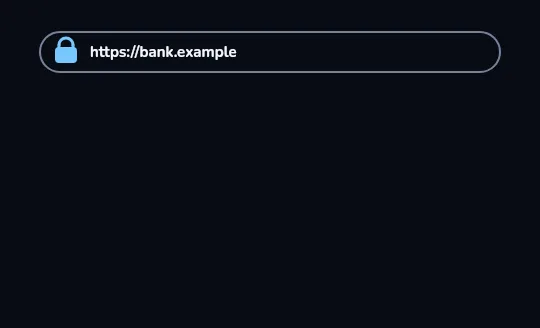
The real address This is the real address bar: a closed padlock and https://bank.example. Nothing else is on screen yet — this is the baseline to compare against.
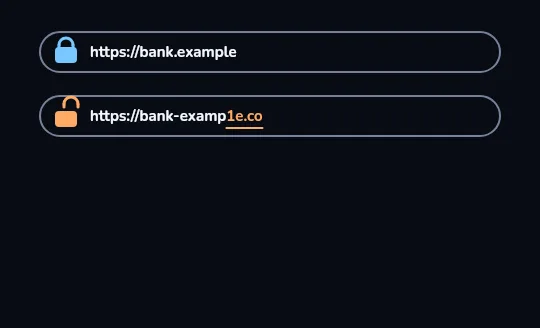
A look-alike, side by side A second address bar appears underneath with an open orange padlock: https://bank-examp1e.co. The "1e.co" part is highlighted: a digit 1 stands in for the letter l, and the address ends in .co instead of .example — a different domain.
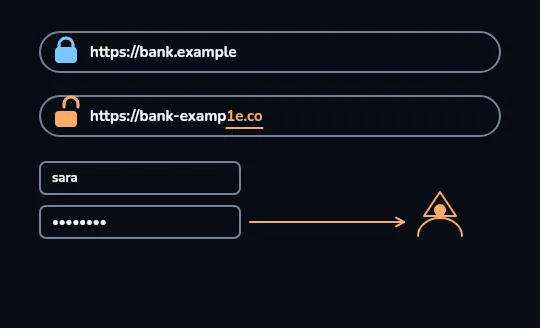
Where a stolen password goes Under the fake bar sits a login form: the username "sara" and a dotted-out password. An orange arrow runs straight from the password field to a hooded figure on the right: on the fake page, whatever you type is sent directly to whoever built it.
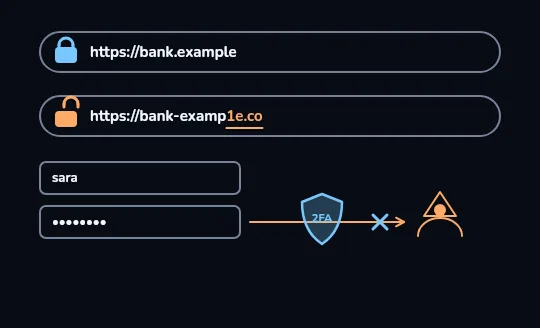
A second step stops it A blue shield marked 2FA now blocks that same arrow, with an X right before it reaches the attacker. Even with the password in hand, the thief is stopped: a second step, a code from your phone, is something the fake page never had.
Check yourself
Match each part of the picture to what it means
Show the answer
- The open orange padlock on the second bar → A valid connection, but to a fake domain — the padlock alone doesn't help
- "1e.co" instead of ".example" → A digit swapped for a letter, and a different ending
- The arrow from the password field to the hooded figure → A stolen password going straight to the attacker
- The 2FA shield with an X → A second step that stops the password alone from working
Three habits that catch what your eye misses
- A password manager only fills a password into the exact domain it was saved for; on bank-examp1e.co it simply offers nothing, even if you don't notice the swap.
- A second step, 2FA, a code from an app or SMS, means a stolen password alone isn't enough to get in.
- Public Wi-Fi is fine for sites you reach over HTTPS, the padlock; typing a password into a login page that isn't on HTTPS, on any network, is the real risk.
Check yourself
Sort each situation as safe or a warning sign
- Reading your usual news site over HTTPS on café Wi-Fi
- An SMS demanding you log in within 10 minutes or lose your account
- Your password manager offers to fill your bank password on bank.example
- A login page reached from an email link that has no padlock at all
- Entering a 2FA code the app on your phone generated
- Your password manager stays empty on a page that looks exactly like your bank
Show the answer
Safe to continue: Reading your usual news site over HTTPS on café Wi-Fi, Your password manager offers to fill your bank password on bank.example, Entering a 2FA code the app on your phone generated
Stop and check: An SMS demanding you log in within 10 minutes or lose your account, A login page reached from an email link that has no padlock at all, Your password manager stays empty on a page that looks exactly like your bank
Your checklist before you log in
- Read the domain itself, before the first slash — not just the start of it.
- A padlock means encrypted, not honest; check who owns the domain, not just that it's https://.
- Being rushed to log in right now is the biggest warning sign there is.
- Trust your password manager's silence: if it won't fill the field, stop.
- Turn on a second step (2FA) everywhere it's offered, and keep public Wi-Fi logins to HTTPS pages only.